
DIY Thai Non-B e-Visa Guide 2026: Mukdahan to Savannakhet & Vientiane Walkthrough
DIY Thai Non-B e-Visa Run:
Mukdahan to Savannakhet & Vientiane
Sawasdee from Ban Lum. Whether you are heading across Thai-Lao Friendship Bridge II to Savannakhet or crossing into Vientiane, the Thai Non-Immigrant B visa is now processed through thaievisa.go.th. Upload your school documents as a draft before leaving Thailand, record your international bus number at Platform 10, upload your Laos entry stamp after crossing, and pay 2,000 THB cash at the consulate between 9:00 and 11:00 AM.
The 6-Stage Non-B e-Visa Timeline
How the DIY Laos visa run flows from pre-trip draft uploads in Thailand to your 90-day Non-B entry stamp.
1. Prepare Documents & Save Draft
Gather your school contract, Education Area letter, Thai police clearance, passport bio page, and ID photo. Compress every file under 3 MB, create your e-Visa account, and upload available files as a saved draft before leaving Thailand.
2. Cross to Laos, Upload Stamp & Submit
Take the international bus to Savannakhet (or Vientiane), record your 4-digit bus vehicle number, photograph your new Laos entry stamp, upload it to your draft, click Submit, and print your PDF payment receipt.
3. Pay 2,000 THB Cash at the Consulate
Bring your printed Payment Info Summary receipt and 2,000 THB in crisp cash to the Royal Thai Consulate-General in Savannakhet (or Vientiane Embassy) strictly between 9:00 AM and 11:00 AM on working days.
4. Wait for Consular Email Approval
The consulate processes your application in roughly 2 to 7 working days. Check your email inbox and spam folder daily in case the officer requests an additional or clearer document scan.
5. Receive & Print Your Approved e-Visa
Once approved, your official THAI E-VISA PDF is emailed to you. Download it, print a physical paper copy at your hotel or a local print shop, and keep a digital backup on your phone.
6. Complete TDAC & Re-Enter Thailand
Fill out your free Thailand Digital Arrival Card (TDAC) 1 day before returning. Ride the international bus back across the bridge, visit the left-side visa booth, and receive your 90-day Non-B stamp!
Upload Drafts Early & Keep All Files Under 3 MB
Uploading your school dossier in Thailand while on fast Wi-Fi saves huge stress. Just click Save (never "Submit"). Make sure every single PDF or JPG is under 3 MB—use an online PDF compressor if your multi-page school contract or Education Area letter is too large.
Cash Logistics & Daily Email Monitoring
Keep crisp physical Thai Baht cash on hand for day-of expenses: 2,000 THB for the consulate visa fee, 1,800 THB if you need a Laos Visa on Arrival (Non-ASEAN passports), plus small notes (45 THB / 55 THB / 30 THB) for bus tickets, border gates, and local printing shops.
Traveling from Mukdahan to Savannakhet, Laos
Spacious, high-visibility field photos from Mukdahan Bus Terminal Platform 10 across Thai-Lao Friendship Bridge II.
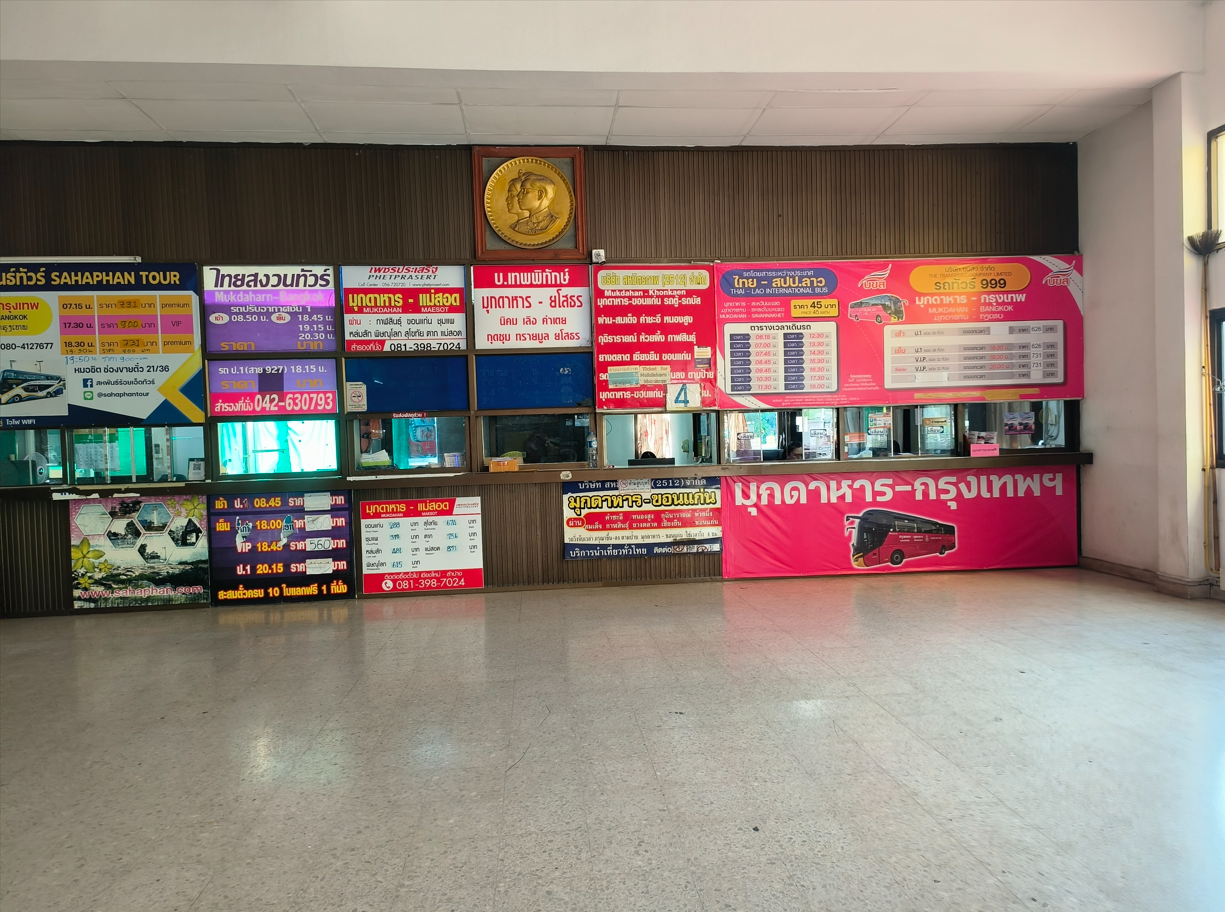
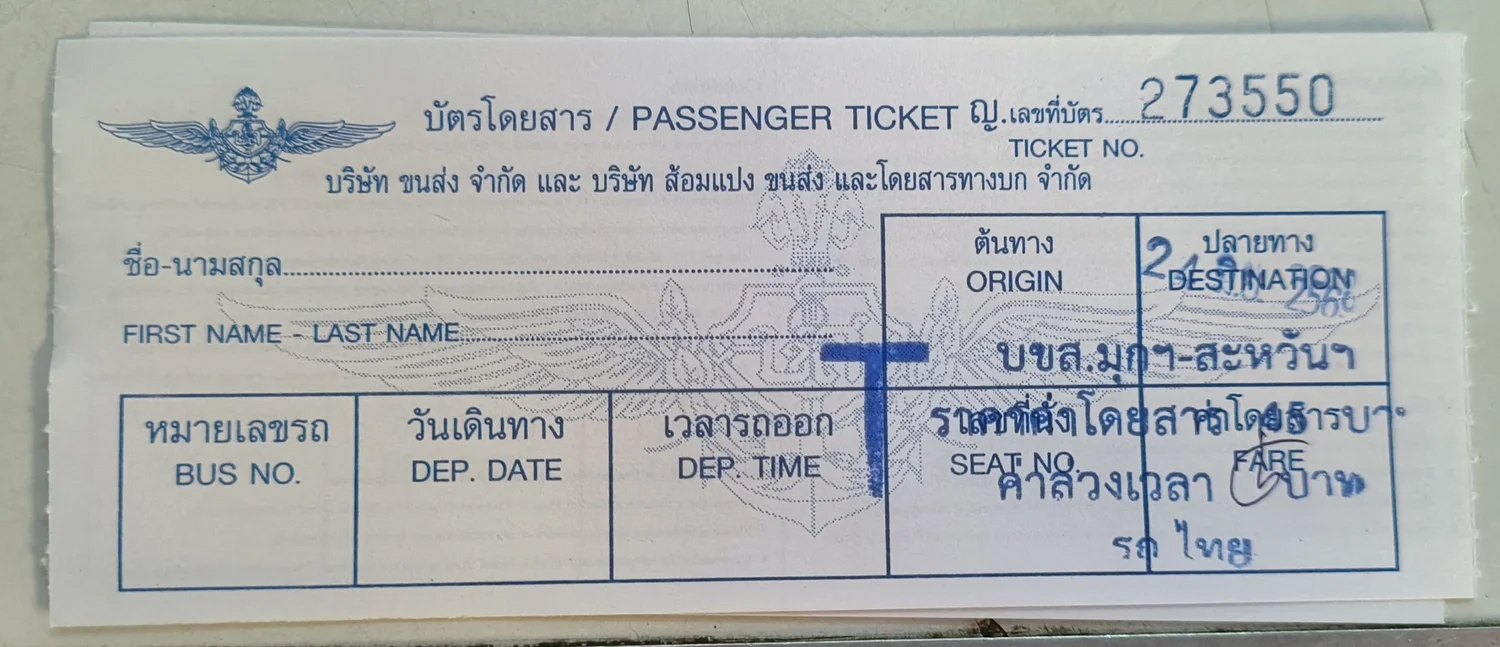
Buy Your 45 THB International Bus Ticket
At Mukdahan Bus Terminal, walk to the Thai–Lao International Bus (ไทย - สปป.ลาว) ticket booth. The base fare is 45 THB per person (a small 5 THB overtime fee may be stamped on early morning or weekend runs).
Check the 14 Daily Bus Departures
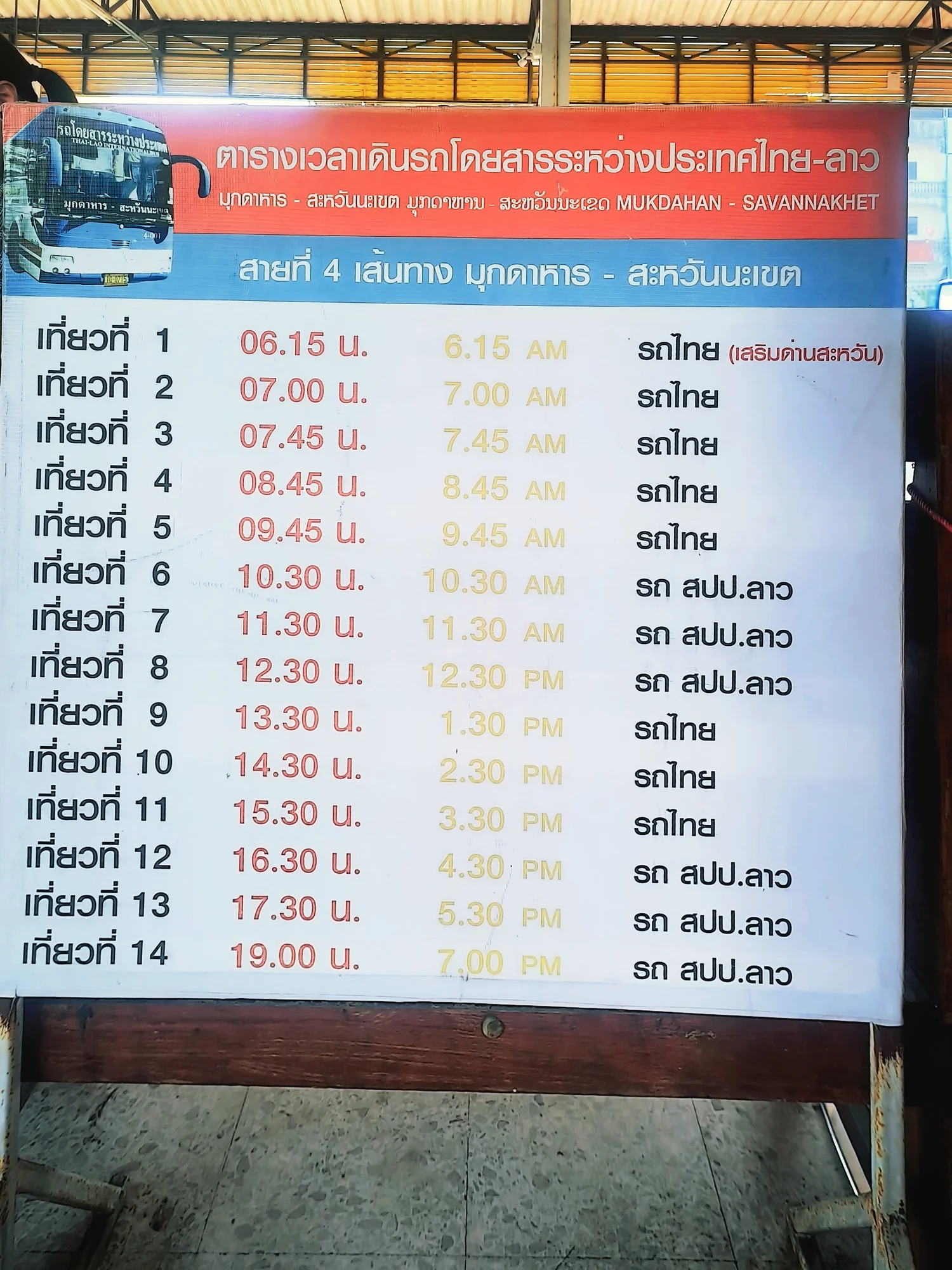
Route 4 (Mukdahan – Savannakhet) runs 14 daily trips starting at 06:15 AM through 19:00 PM, alternating between Thai buses (รถไทย) and Lao buses (รถ สปป.ลาว).
Board at Platform 10 & Note Bus Number
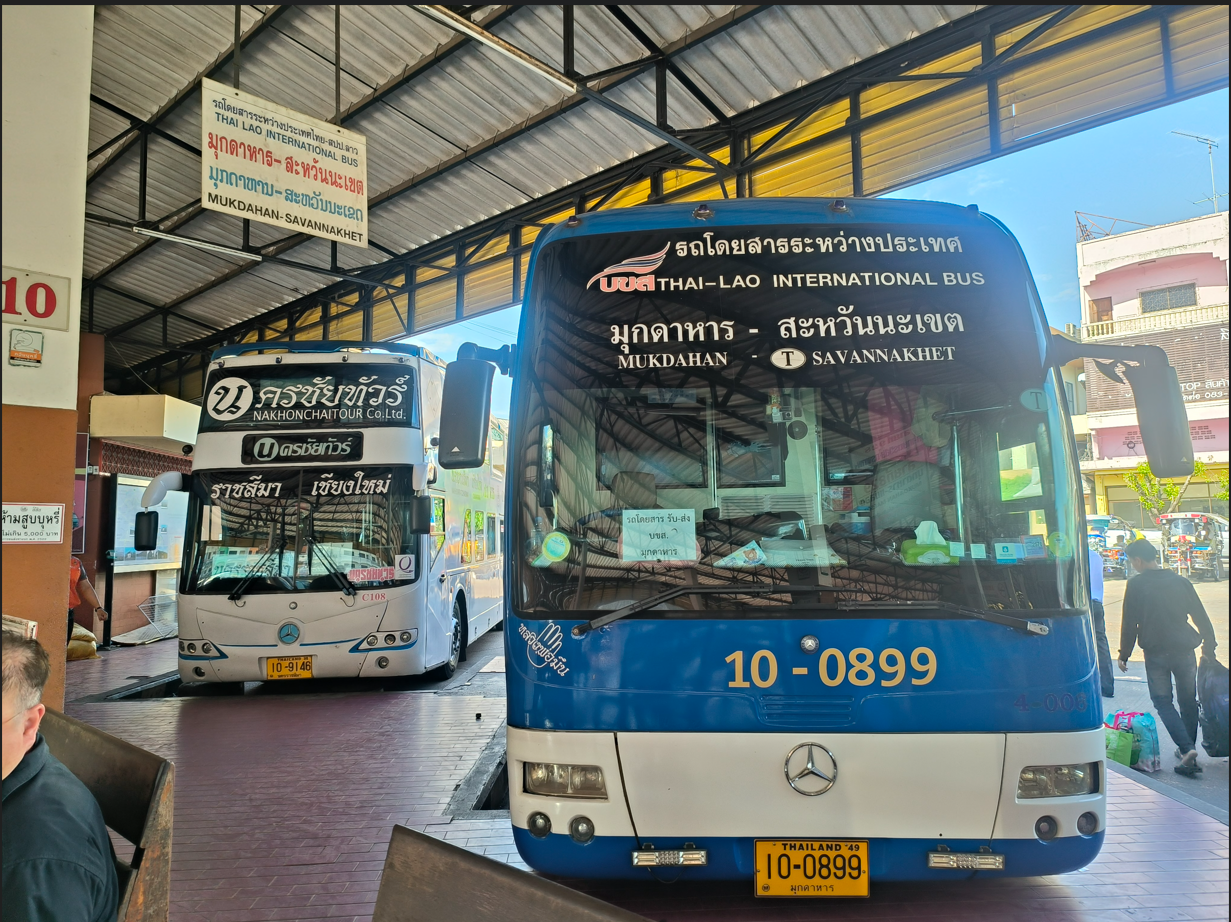
Head to Platform 10. Photograph the front of your bus and write down the Vehicle Number (for example, 0899 on bus 10-0899)—you must type this exact number into Step 3 of the online e-Visa form!
Exit Thai Immigration at Friendship Bridge II
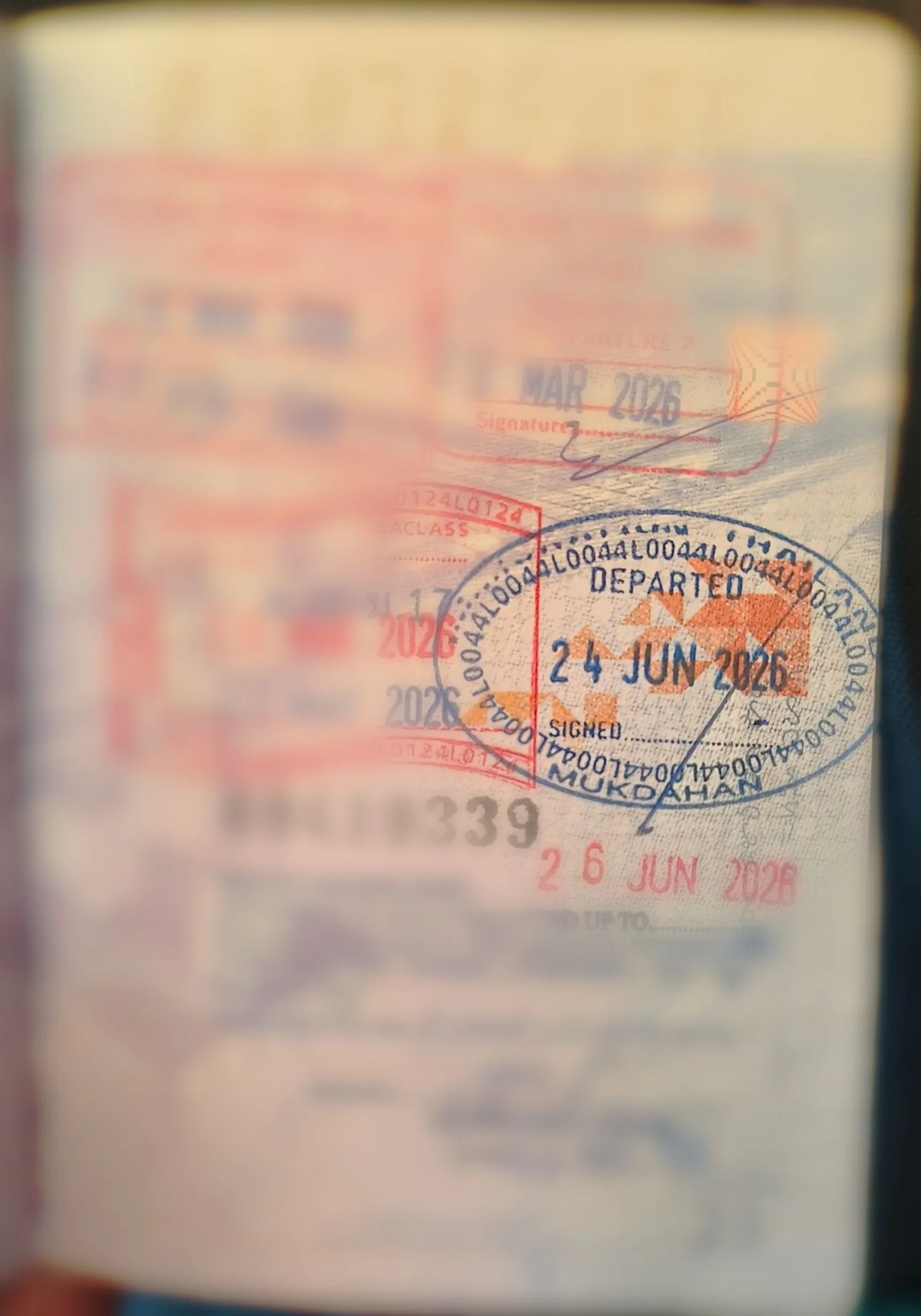
The bus stops at the Thai Immigration Checkpoint. Disembark with your passport, get stamped out of Thailand (DEPARTED MUKDAHAN), and re-board the exact same bus to cross the Mekong River (5–10 minutes).
Enter Laos & Get Your Entry Stamp
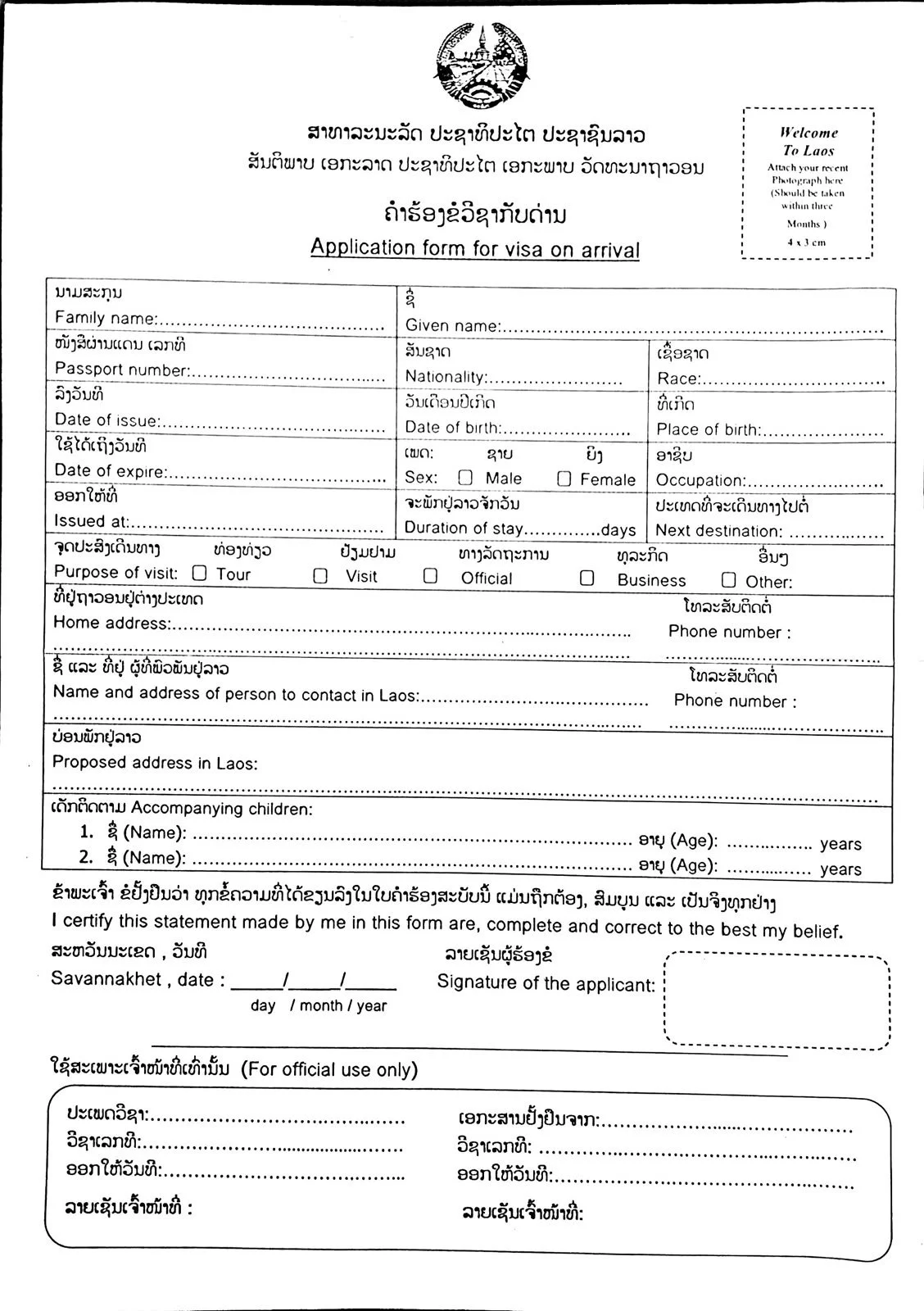
ASEAN Passports: Go straight to the immigration counter. Non-ASEAN Passports: Go to the Visa on Arrival window with 1 passport photo + 1,800 THB cash. Tell the officer you are in Laos to process your Thai Non-B visa.
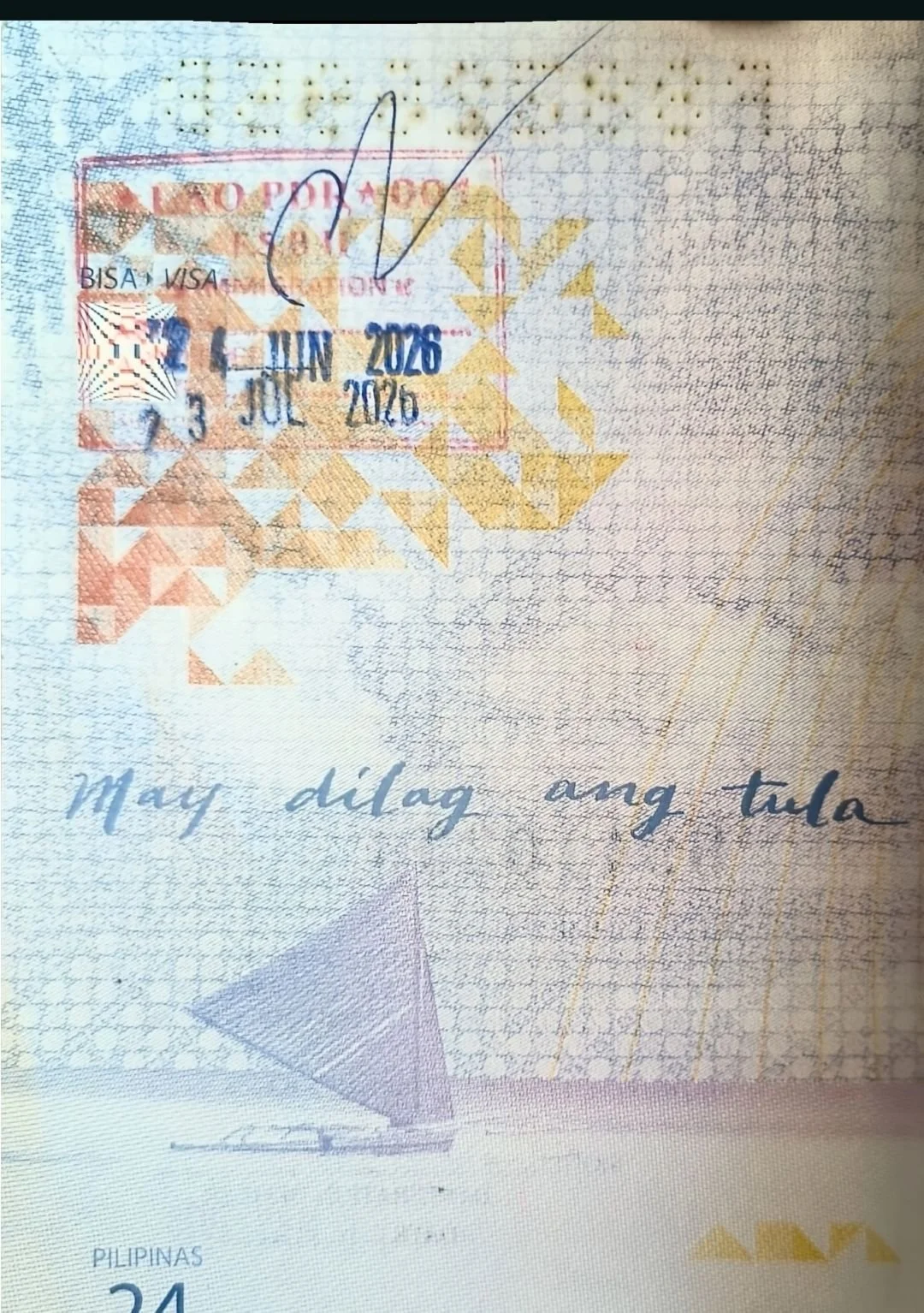
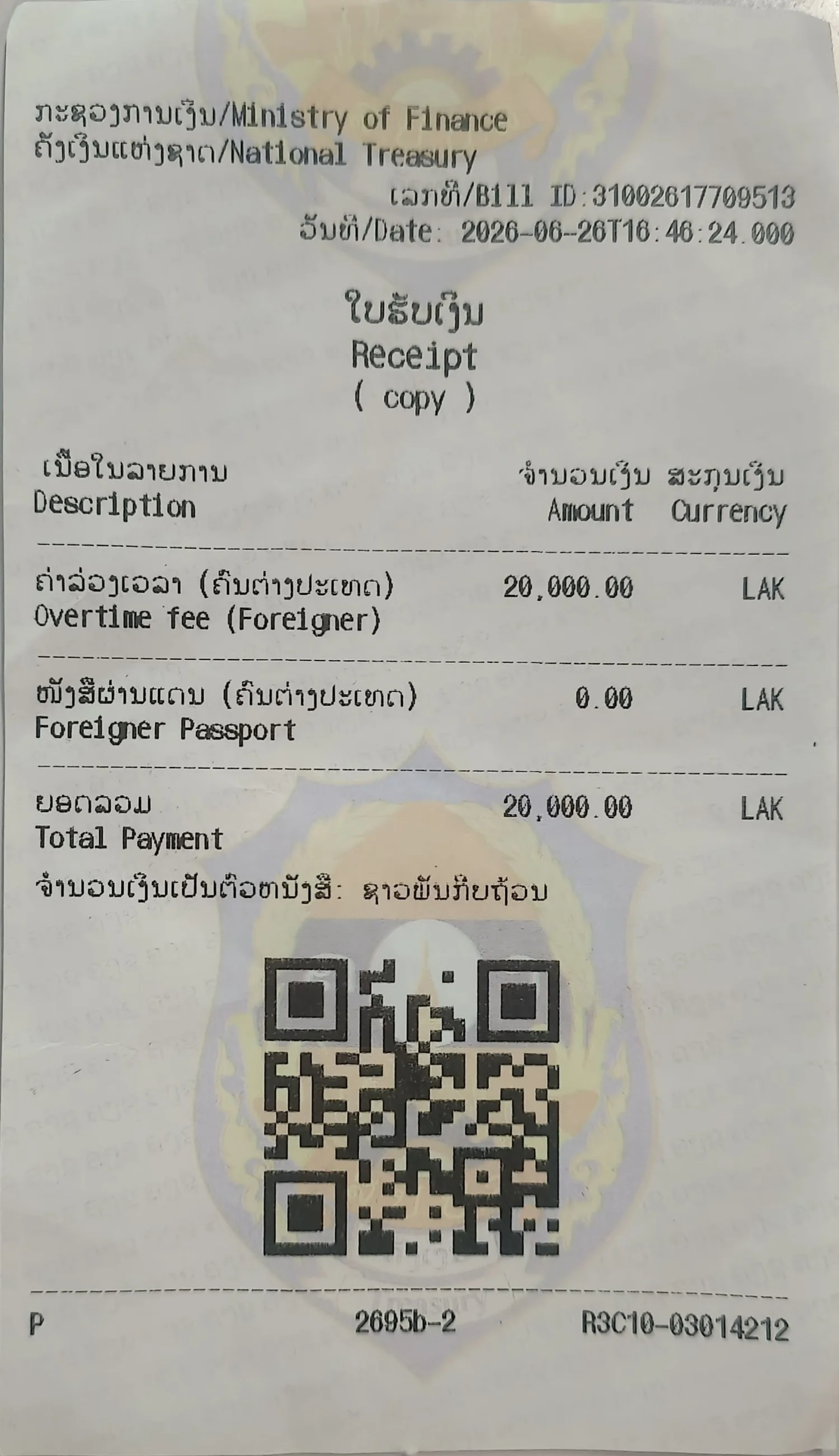
Purchase the 30 THB (20,000 LAK) Gate Ticket
After receiving your Laos entry stamp, walk to the exit gate booth and pay the 30 THB (or 20,000 LAK) border fee. Scan the QR receipt at the turnstile gate so the doors open to the arrivals area.
| Trip # | Mukdahan → Savannakhet (45 THB) | Operator | Savannakhet → Mukdahan (55 THB / 40,000 LAK) |
|---|---|---|---|
| Trip 1–4 | 06:15 AM, 07:00 AM, 07:45 AM, 08:45 AM | Thai Bus (รถไทย) | 08:15 AM, 09:00 AM, 09:45 AM, 10:30 AM |
| Trip 5–8 | 09:45 AM (Thai) | 10:30, 11:30, 12:30 PM (Lao) | Thai / Lao Bus | 11:30 AM, 12:30 PM, 13:30 PM, 14:30 PM |
| Trip 9–11 | 13:30 PM, 14:30 PM, 15:30 PM | Thai Bus (รถไทย) | 15:30 PM, 16:30 PM, 17:30 PM |
| Trip 12–14 | 16:30 PM, 17:30 PM, 19:00 PM | Lao Bus (รถ สปป.ลาว) | 19:00 PM (Final Return Bus — Trip 12) |
Thai e-Visa Portal: Account Setup & Steps 1 to 3
Full-width, high-resolution screenshots of thaievisa.go.th so you can read every dropdown and field label without squinting.
1. Create an Individual Account on thaievisa.go.th
Go to thaievisa.go.th and click Create an account in the top-right corner. Select Individual, enter your First Name, Family Name, Nationality, Contact No., and Email, then click the activation link sent from thaievisa@mfa.go.th.
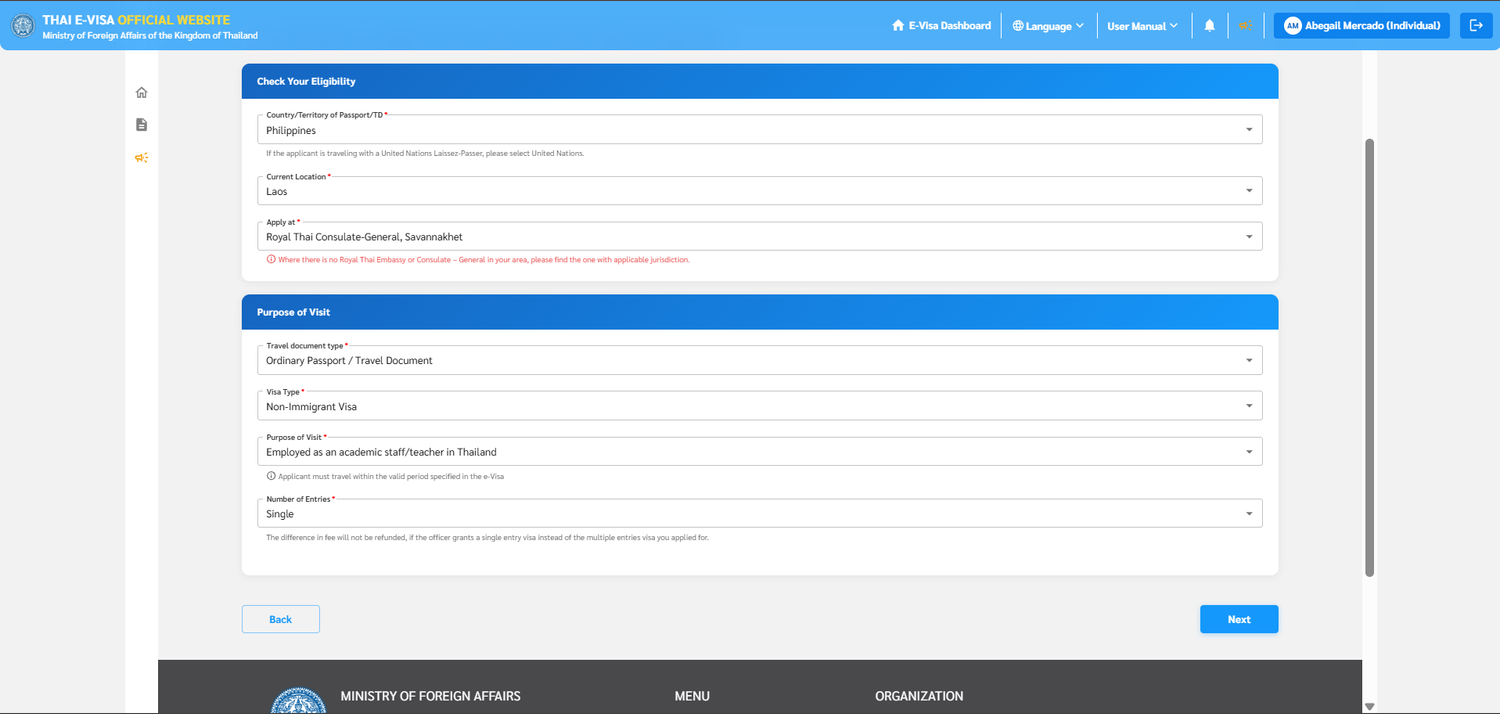
2. Activate via Email Link & Sign In
Open the email titled "Confirm your registration with Thai E-Visa" from thaievisa@mfa.go.th, click the verification link to activate your account, and sign in at thaievisa.go.th/signin using your email, password, and the 6-character security code.
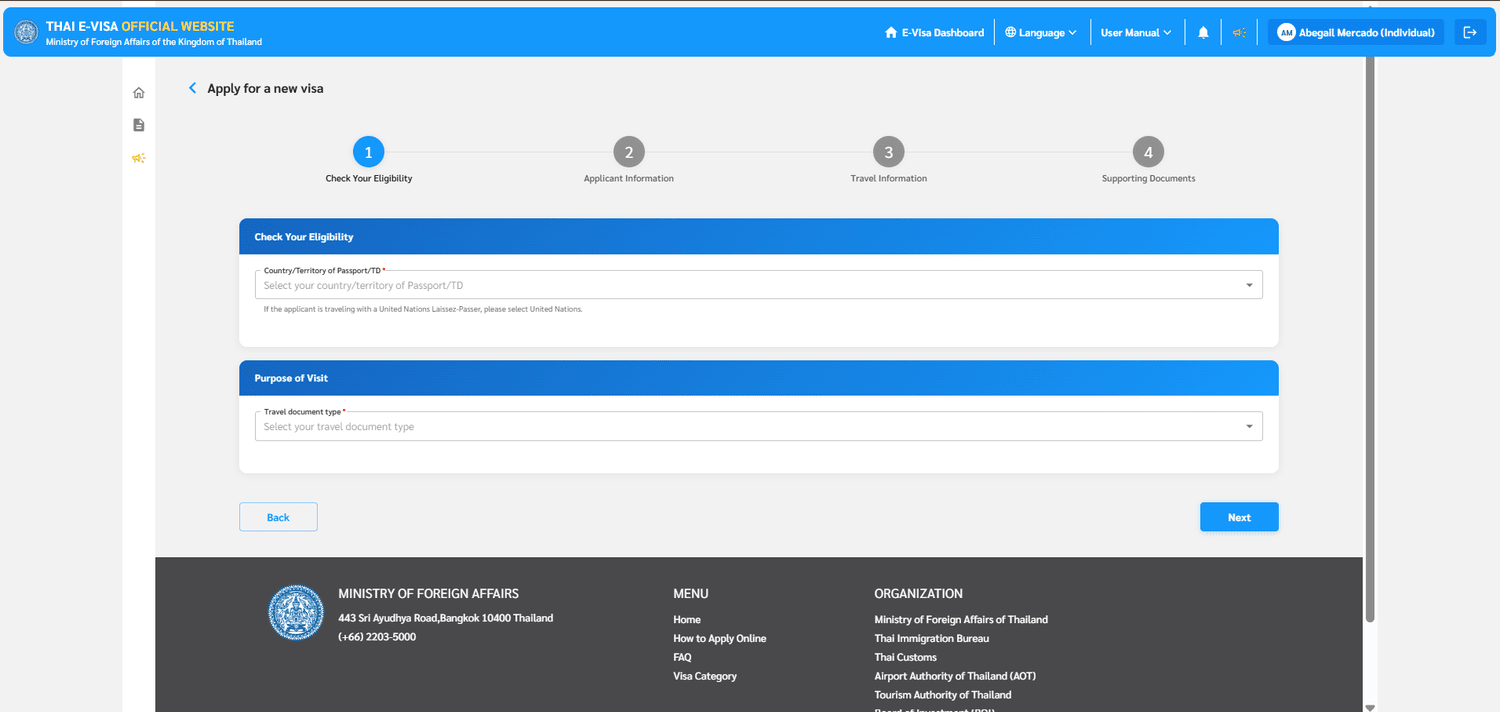
3. Select Passport Country & Ordinary Passport
Under Check your eligibility, select your Country/Territory of Passport/TD and choose Ordinary Passport / Travel Document as your travel document type.
4. Match Your Consulate & Select Teacher Purpose
Set Current Location to Laos. Under Apply at, select Royal Thai Consulate-General, Savannakhet (or Royal Thai Embassy, Vientiane—this must match where you physically pay in Laos!). Select Non-Immigrant Visa, Purpose of Visit: Employed as an academic staff/teacher in Thailand, and Number of Entries: Single.
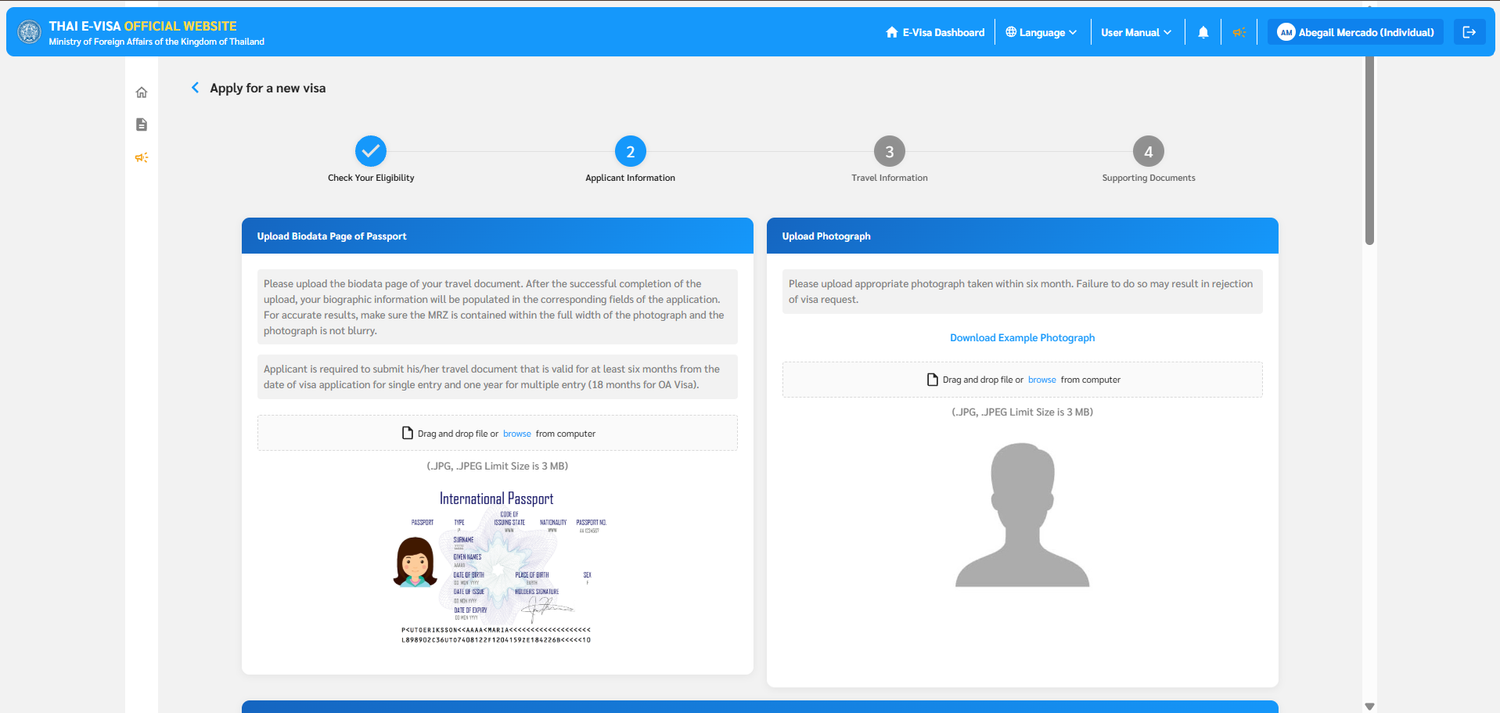
5. Upload Bio Page & Handle the MRZ Pop-Up
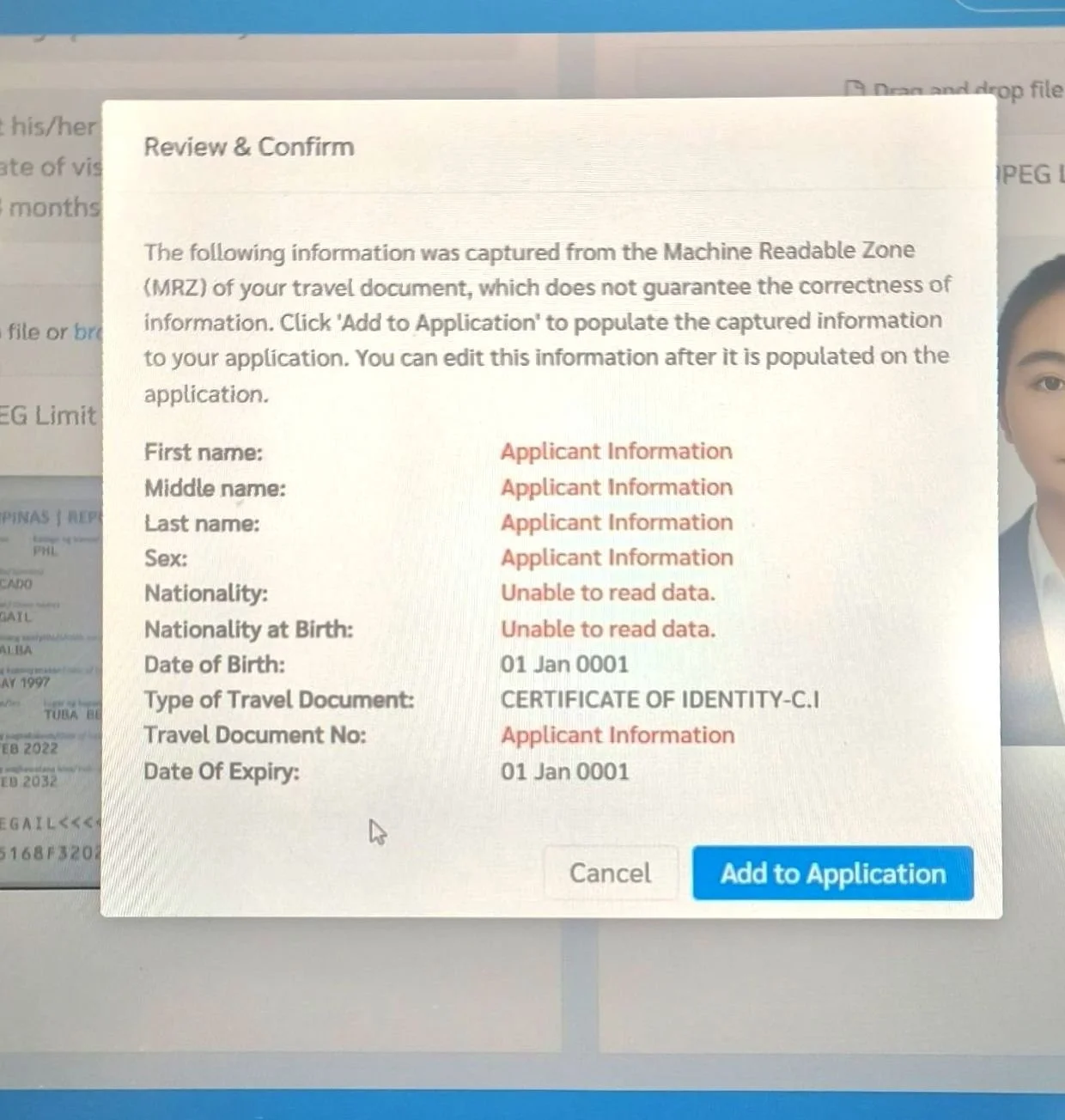
Upload a clear JPG of your passport biodata page and a recent passport photo (< 3 MB). If the Review & Confirm (MRZ) pop-up displays "Unable to read data" or 01 Jan 0001, do not worry—simply click Add to Application and type/edit your personal information manually on the next screen!
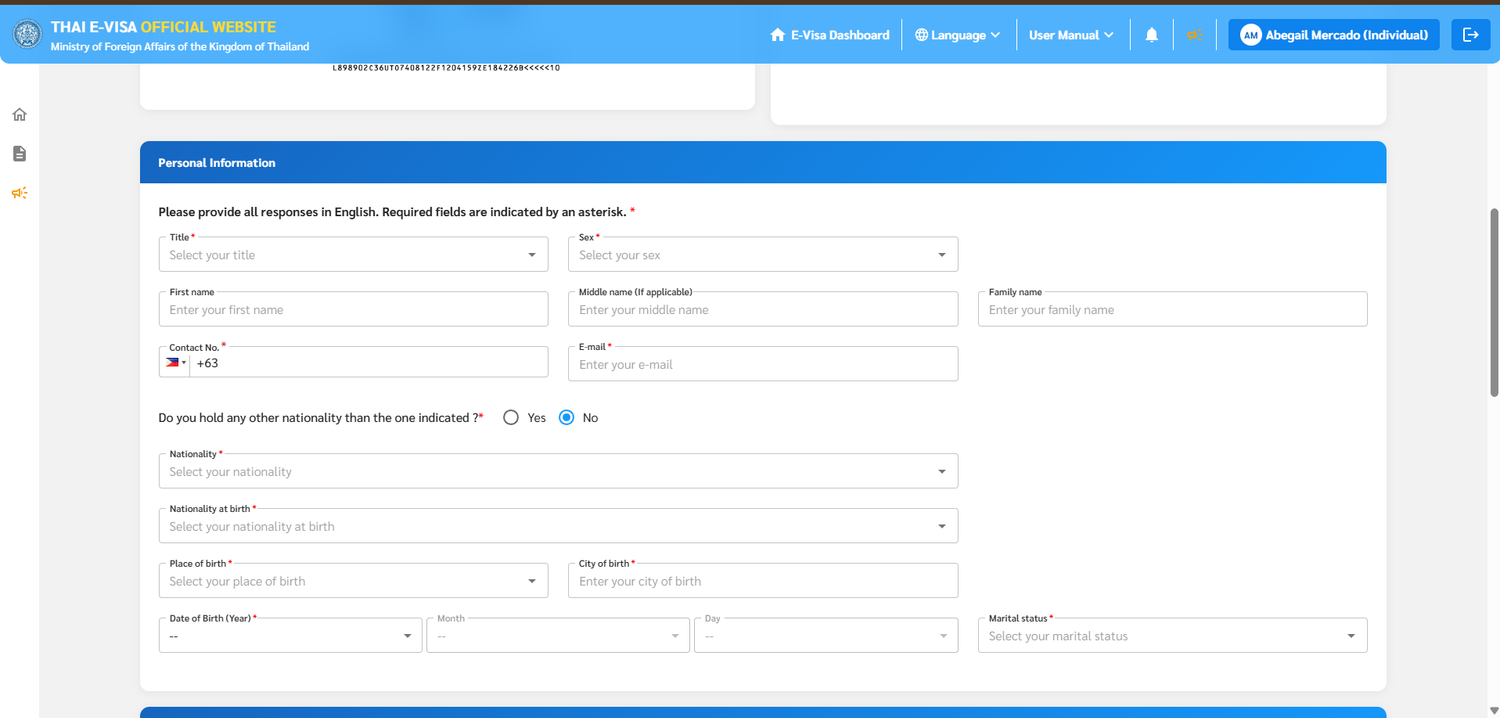
6. Complete Personal Information Exactly as on Passport
Double-check your Title, First Name, Middle Name (if applicable), Family Name, Date of Birth, Place/City of Birth, and Marital Status. Every single letter and space must match your passport bio page 100%.
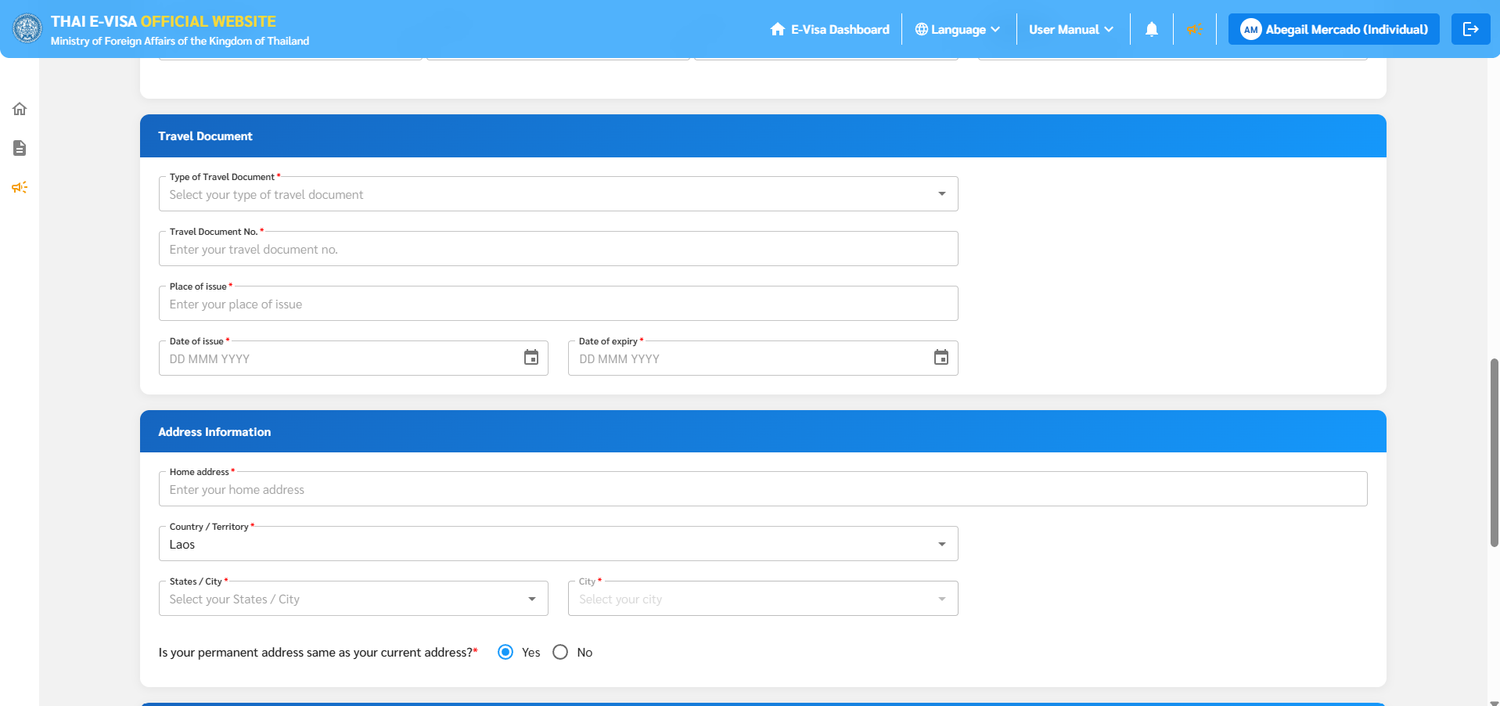
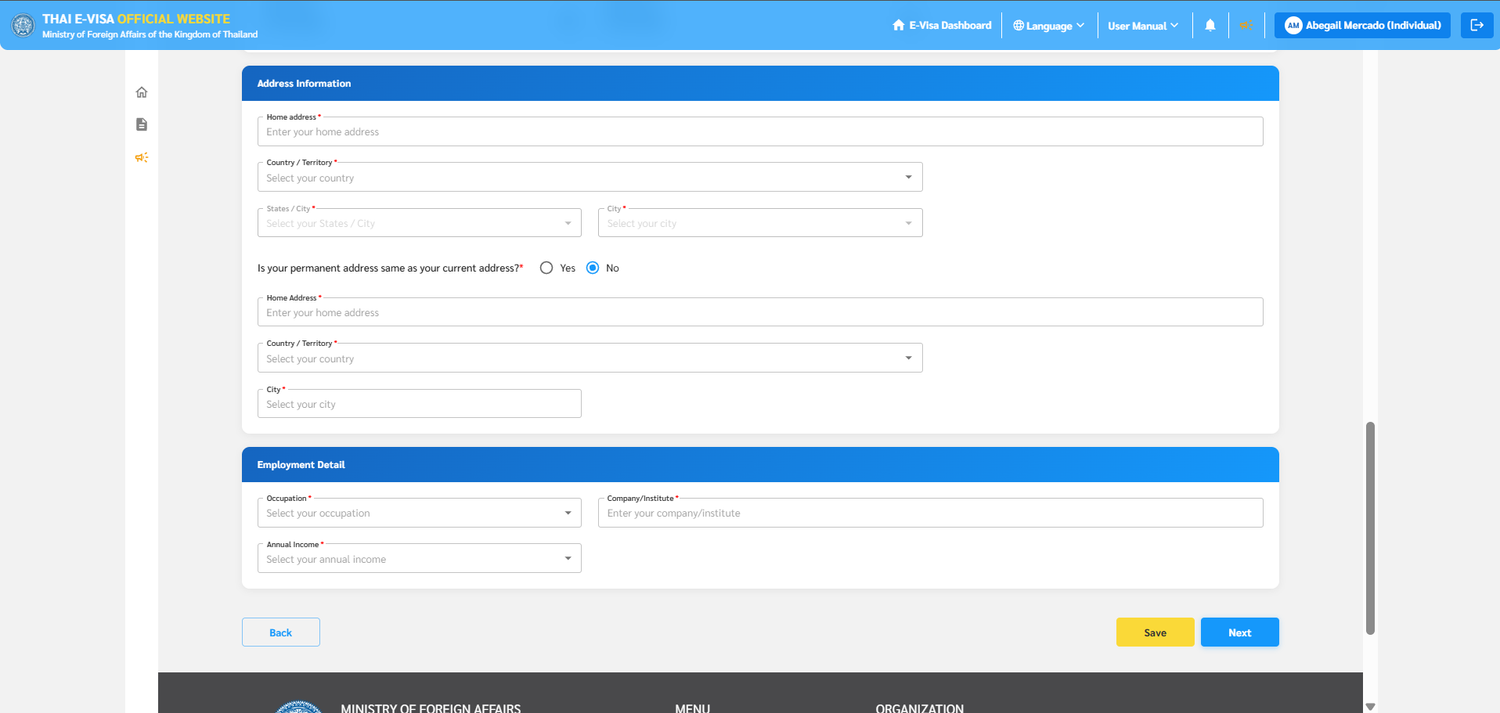
7. Address & School Employment Fields
Enter your current address in Laos and your permanent home country address. Under Employment details: select Employee for Occupation, type the exact name of your Thai school in Company/Institute, and select Under 20,000 USD for Annual Income. Click Save then Next.
8. Travel Dates, Bridge 2 & Bus Vehicle Number
Set Intended date of arrival (your arrival date in Laos) and Intended date of departure (you may set this as early as 2 days after arrival). Select LAND, First Arrival Port: Thai-Lao Friendship Bridge 2 (Mukdahan - Savannakhet), Mode: Bus, and type your Vehicle Number (e.g., 0899). Enter your Thai accommodation details and click Next.
The 6 Required Uploads & Final Submission
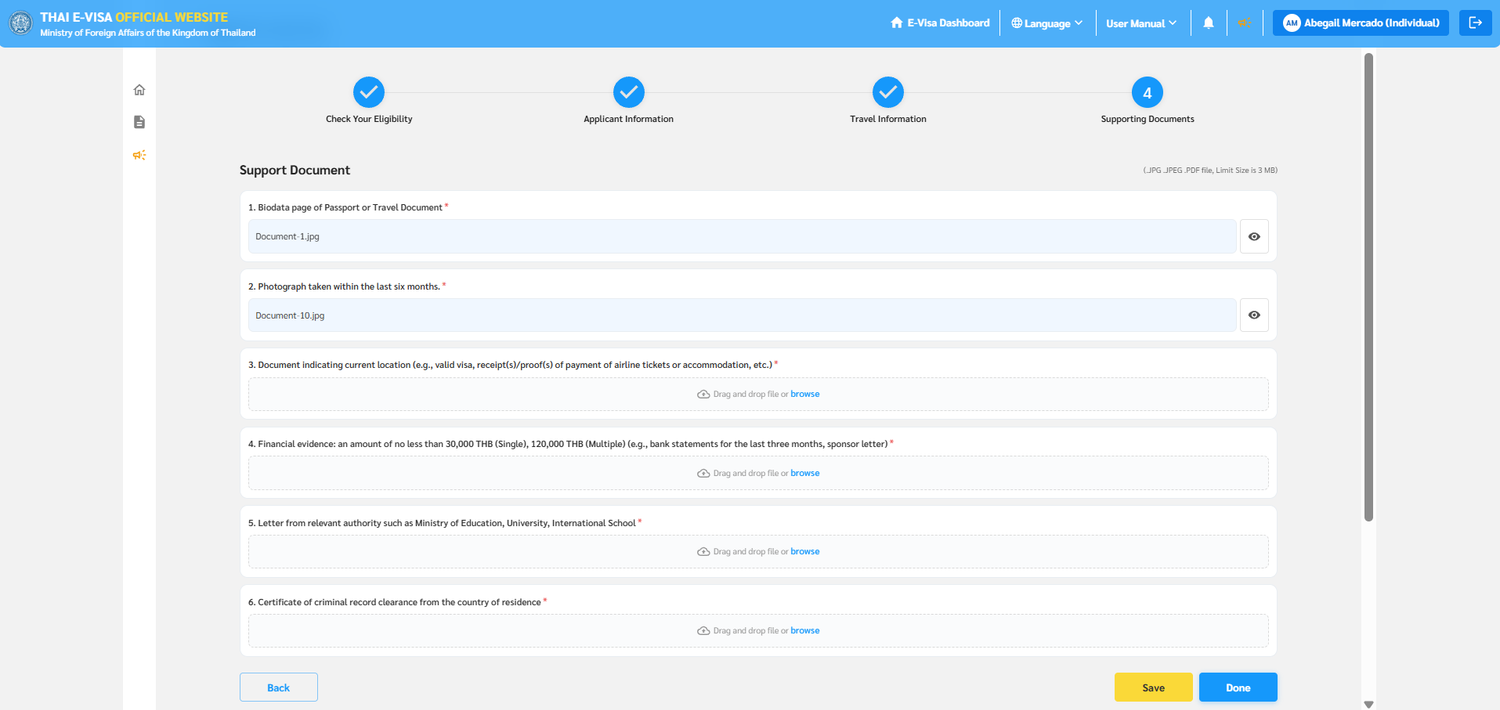
Every uploaded file must be clear, complete, legible, and under 3 MB.
1. Biodata Page of Passport
Automatically populated from the passport bio page JPG you uploaded in Step 2. Verify that the file name appears cleanly in slot #1.
2. Photograph Taken Within Last 6 Months
Automatically populated from the passport-style ID photo you uploaded in Step 2. Plain white background, no glasses or hats.
3. Document Indicating Current Location
Upload a clear photo or PDF of your Laos immigration entry stamp (or Lao visa sticker) that you just received at the Friendship Bridge checkpoint.
4. Financial Evidence (30,000 THB) or Contract
Submit either: (a) Your last 3 months of bank statements showing a minimum balance of 30,000 THB (Single Entry), OR (b) Your signed School Contract.
5. Letter from Relevant Authority
Upload the official approval/invitation letter issued by the Education Area Office (OBEC / OPEC) or relevant Ministry of Education authority provided by your school.
6. Criminal Record Clearance
Upload your Police Clearance Certificate from Thailand (or criminal record clearance from your country of residence). See our Thai police clearance guide.
Preview Applicant Data
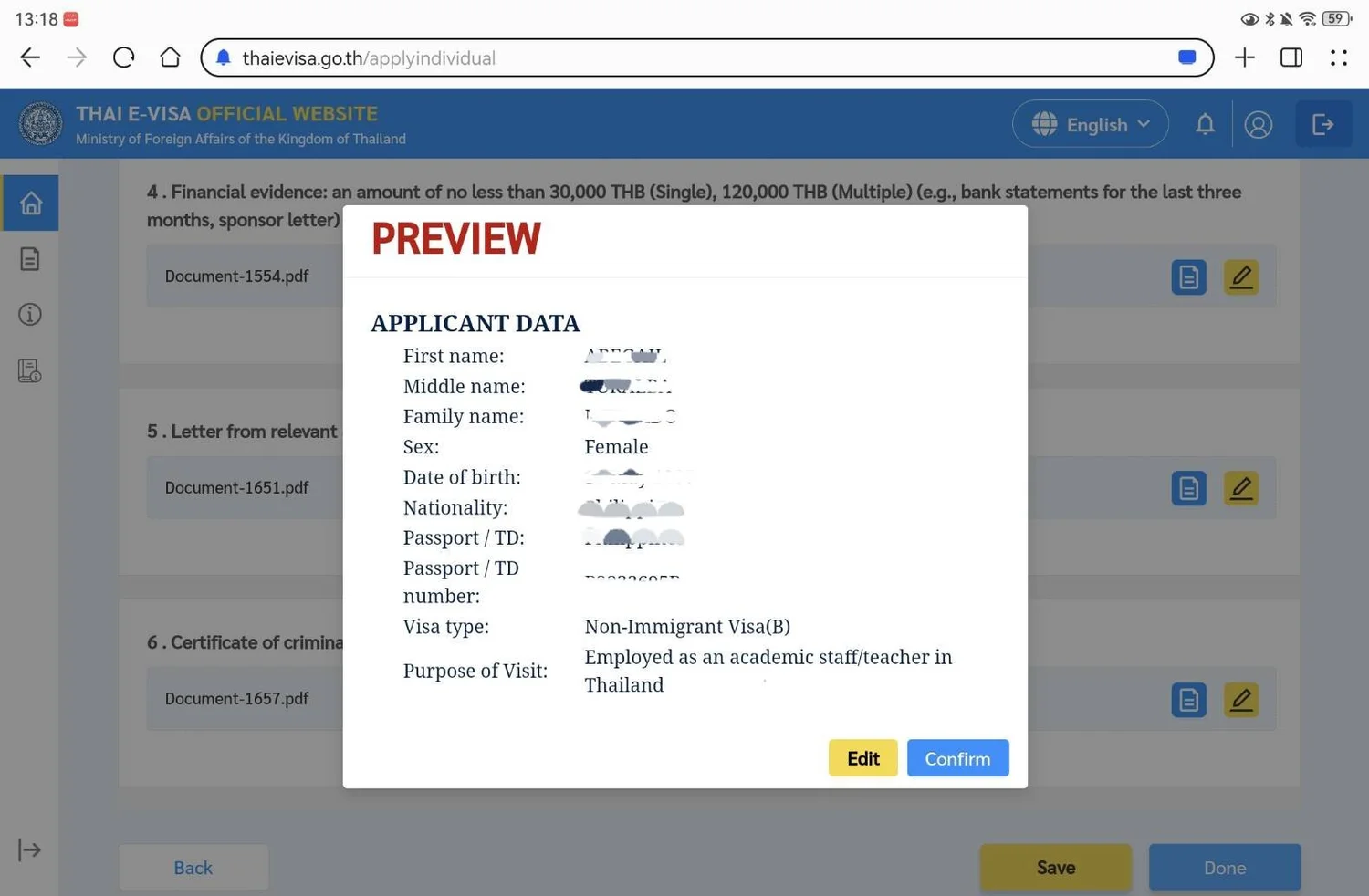
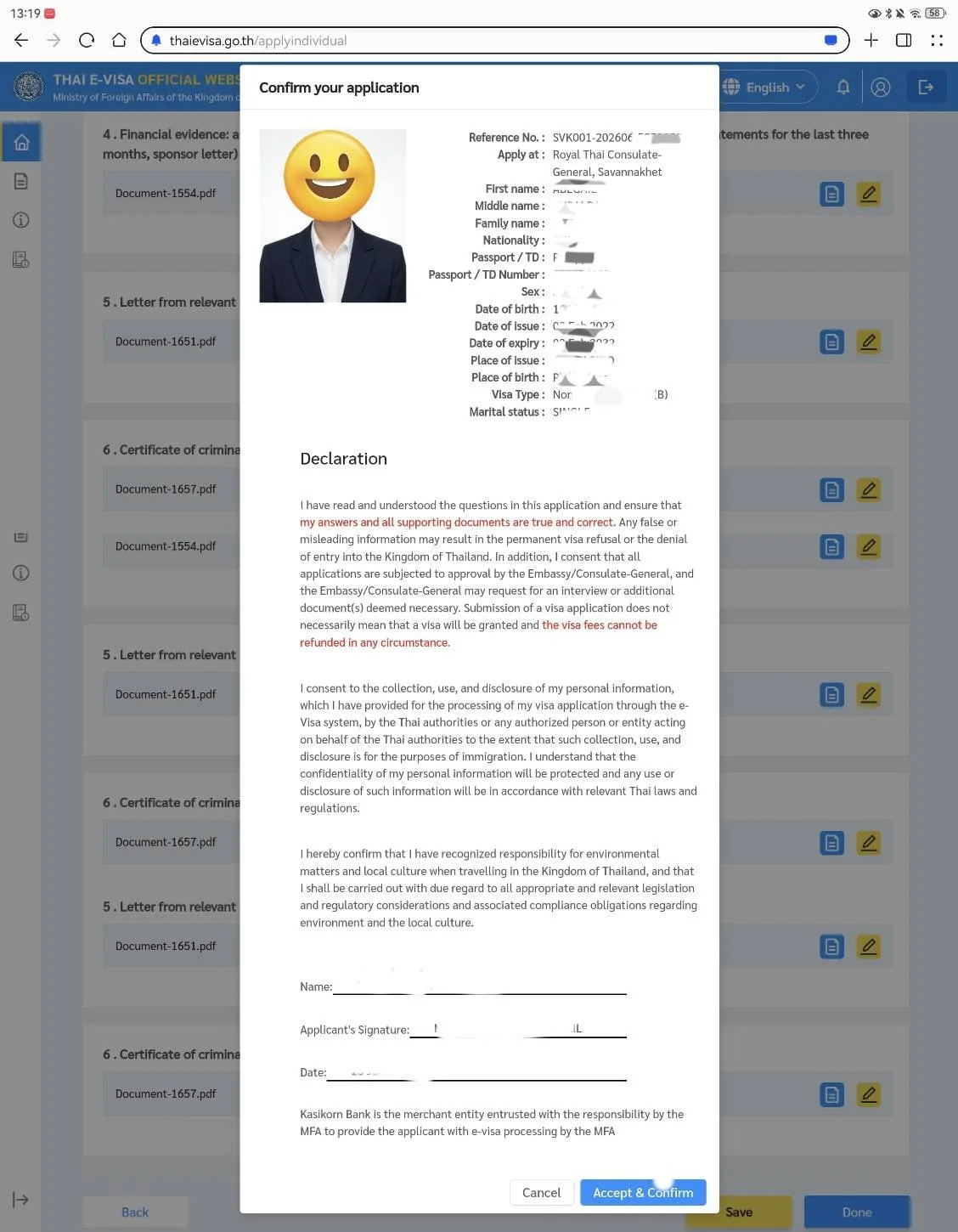
Click Done to open the PREVIEW window. Check your First, Middle, and Family names and Passport Number carefully before clicking Confirm.
Red Warning Check: Exact Name & Passport Match
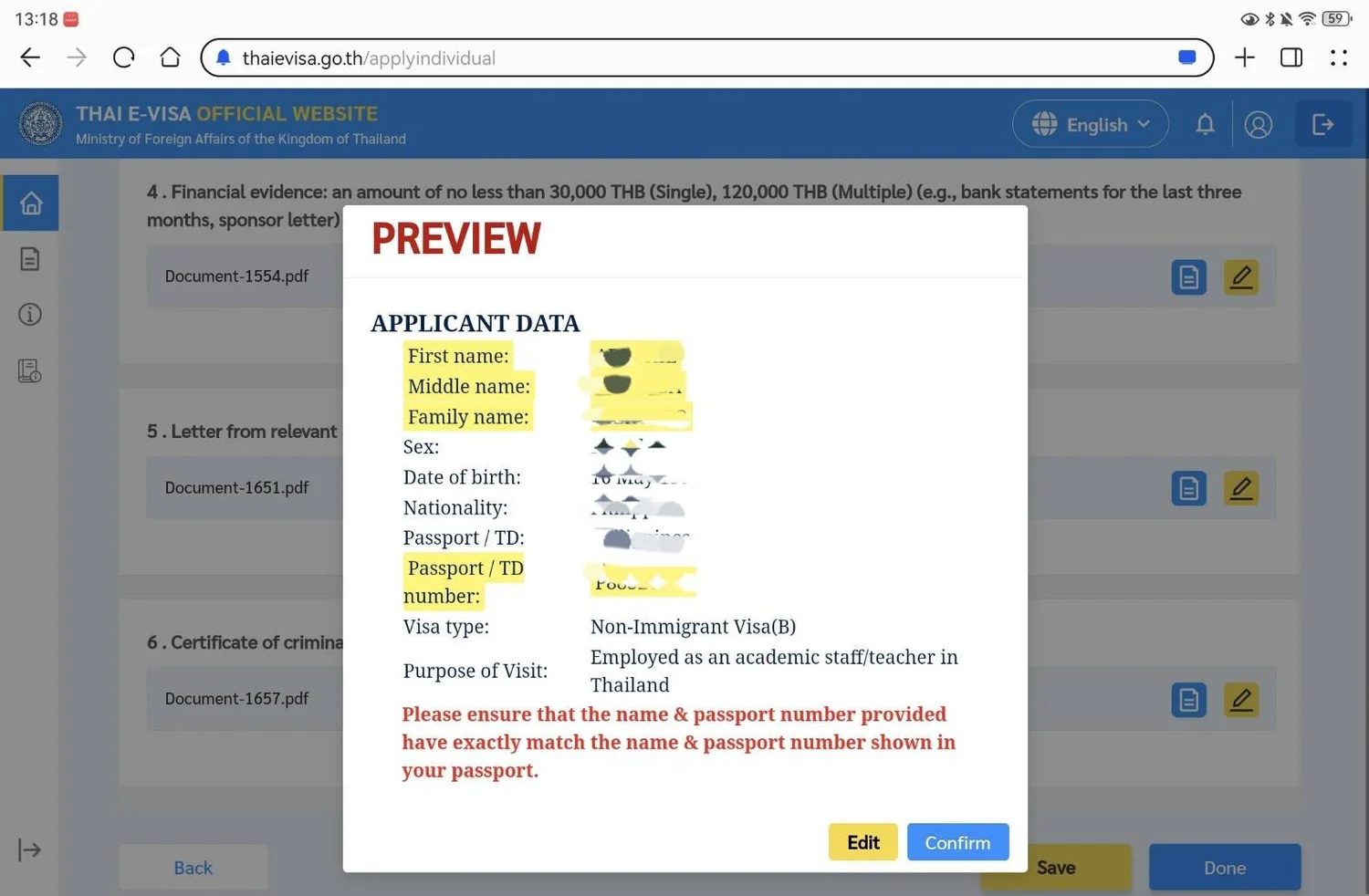
Pay attention to the red notice: "Please ensure that the name & passport number provided have exactly match the name & passport number shown in your passport."
Accept Declaration & Confirm
Review the summary showing your Reference No. (e.g., SVK001-...) and Apply at: Royal Thai Consulate-General, Savannakhet. Scroll down and click Accept & Confirm.
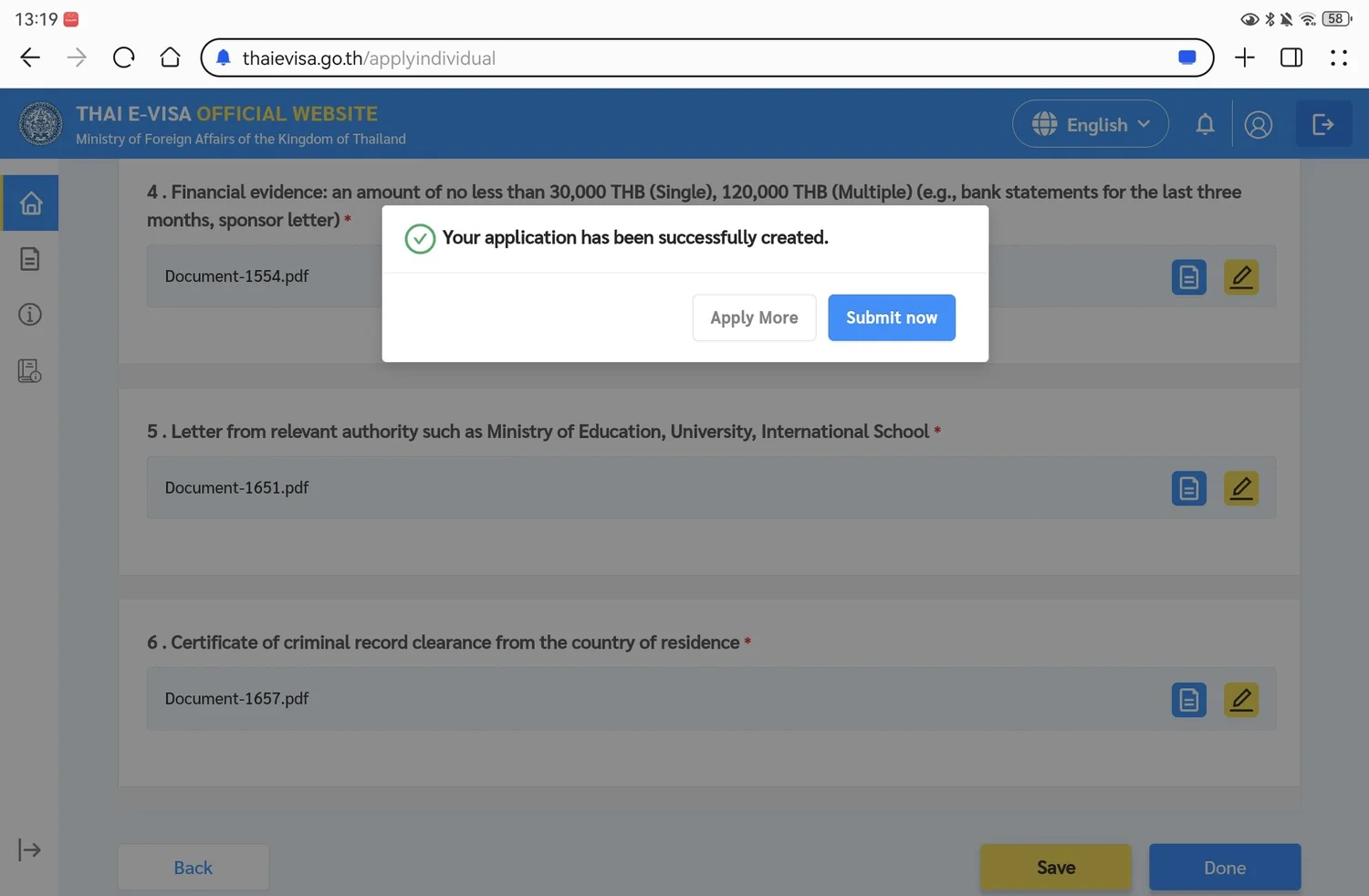
Click "Submit now"
When the pop-up says "Your application has been successfully created", click the blue Submit now button to move to the payment dashboard.
Paying 2,000 THB Cash & Receiving Your e-Visa
How to generate your payment slip, pay at the Savannakhet Consulate between 09:00 and 11:00 AM, and download your approved visa.
1. Manage Visa Applications → Proceed to Payment
Under Manage Visa Application(s) → Ready to submit, tick the checkbox next to your Reference No. (SVK001-...) and click the yellow Proceed to Payment button in the top right. (Unpaid applications are removed after 14 days.)
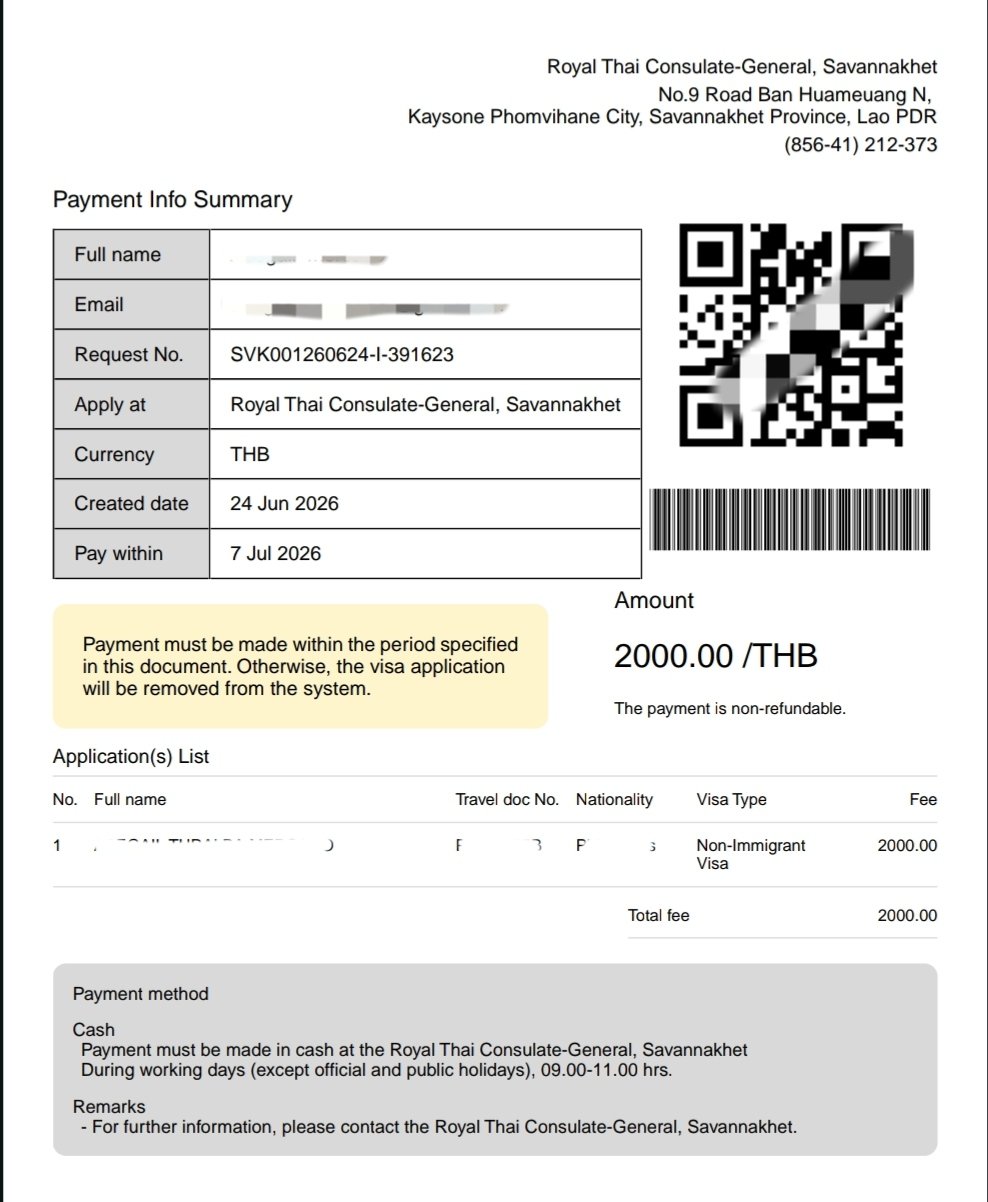
2. Click "Pay at the Consulate-General" (2,000 THB)
On the Payment screen, verify Total application fee: 2000 THB and click the yellow Pay at the Consulate-General button. Download and print a physical copy of the Payment Info Summary PDF (with the QR code).
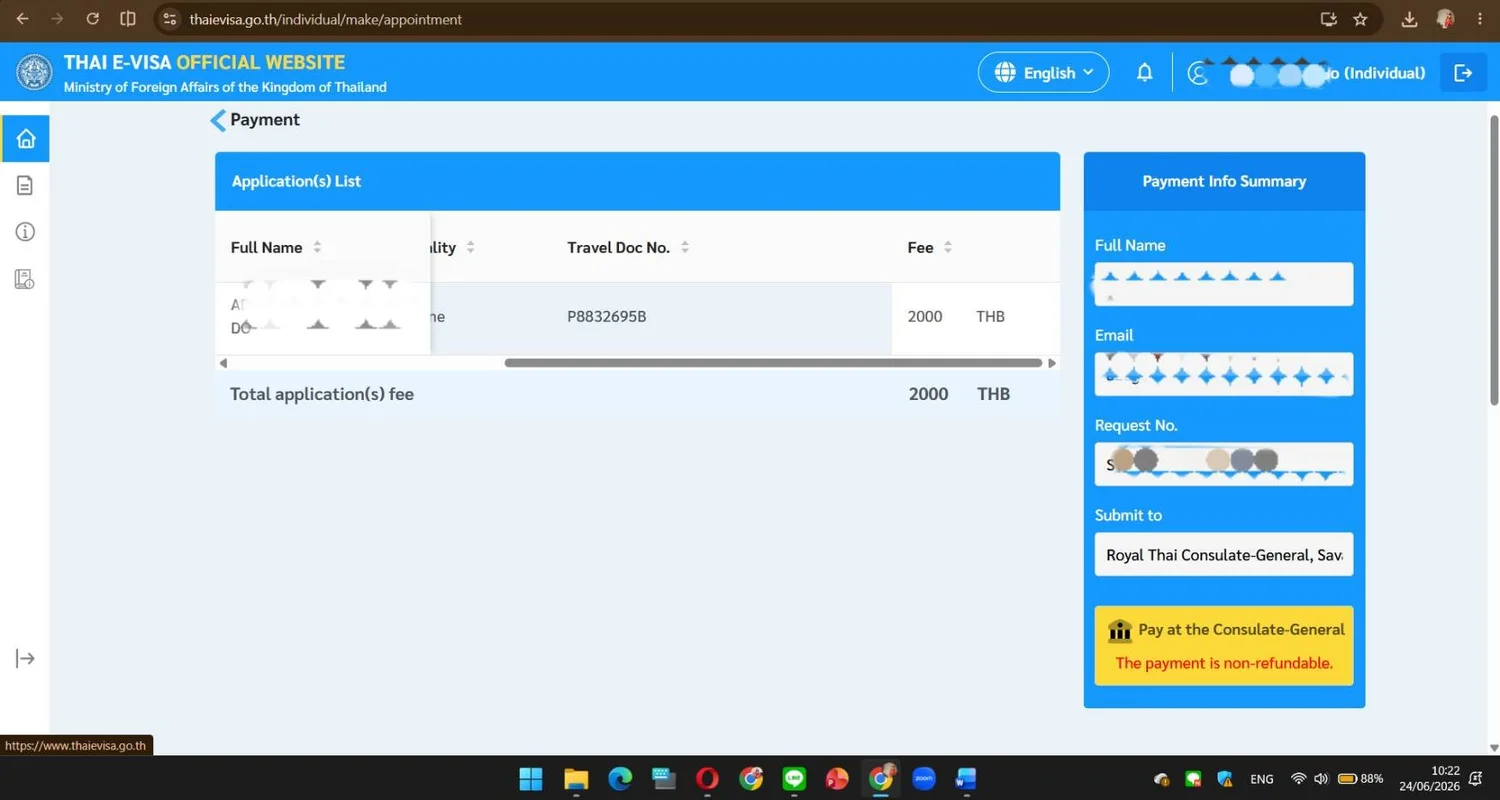
3. Pay 2,000 THB Cash at Savannakhet Consulate
Go to the Royal Thai Consulate-General, Savannakhet (No. 9 Road Ban Huameuang N, Kaysone Phomvihane City, Tel: +856-41-212-373). Bring your printed payment receipt and 2,000 THB cash. Payments are accepted strictly between 9:00 AM and 11:00 AM on working days!
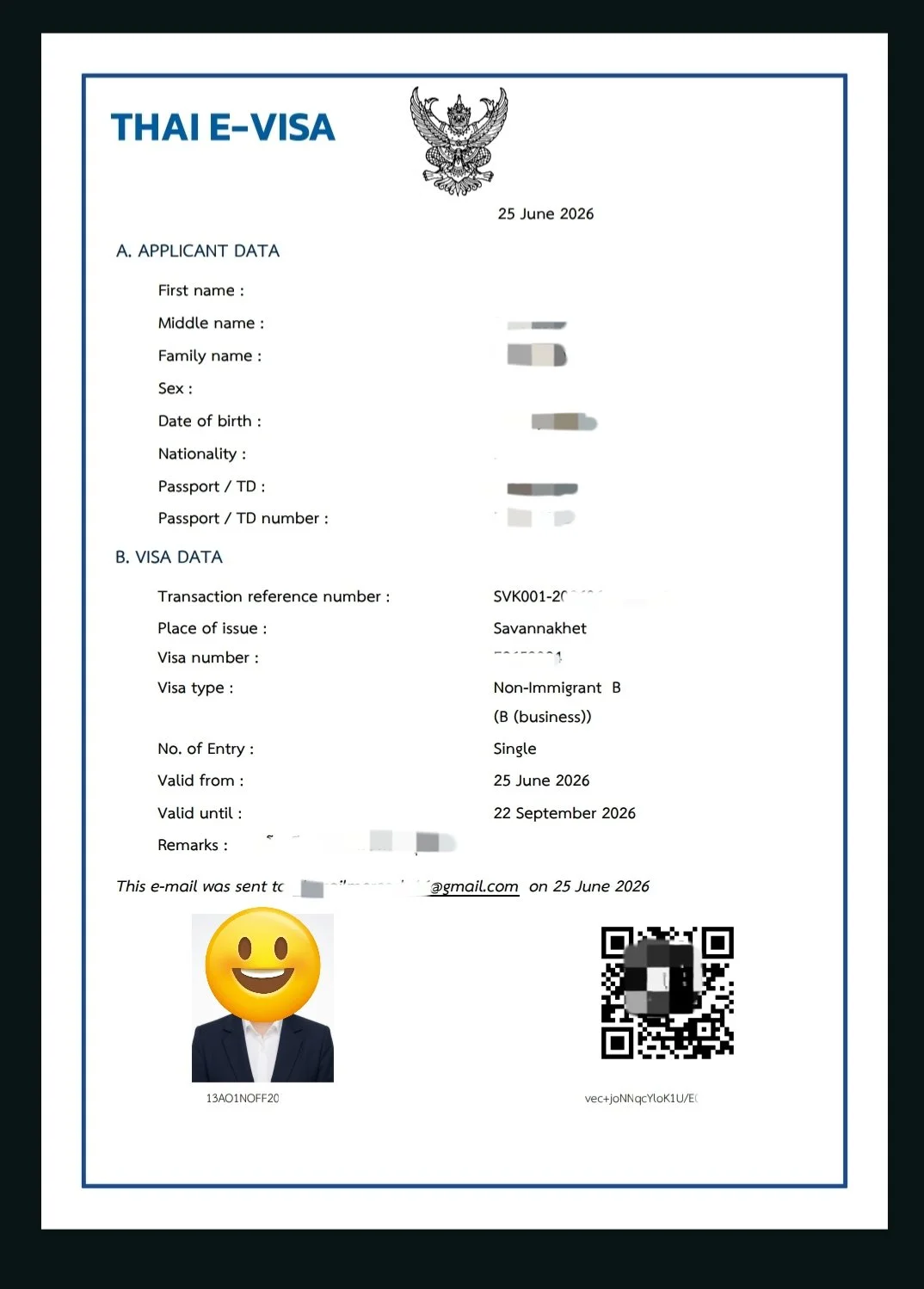
4. Receive Your Approved THAI E-VISA by Email
Check your email daily. Once approved (2–7 business days), you will receive your official THAI E-VISA PDF showing Non-Immigrant B, Single entry, and a 90-day validity window. Print a copy and save the PDF on your phone!
Savannakhet to Mukdahan: TDAC, Screening Form & Non-B Stamp
How to return across Friendship Bridge II and make sure the officer stamps your new 90-day Non-B e-Visa.
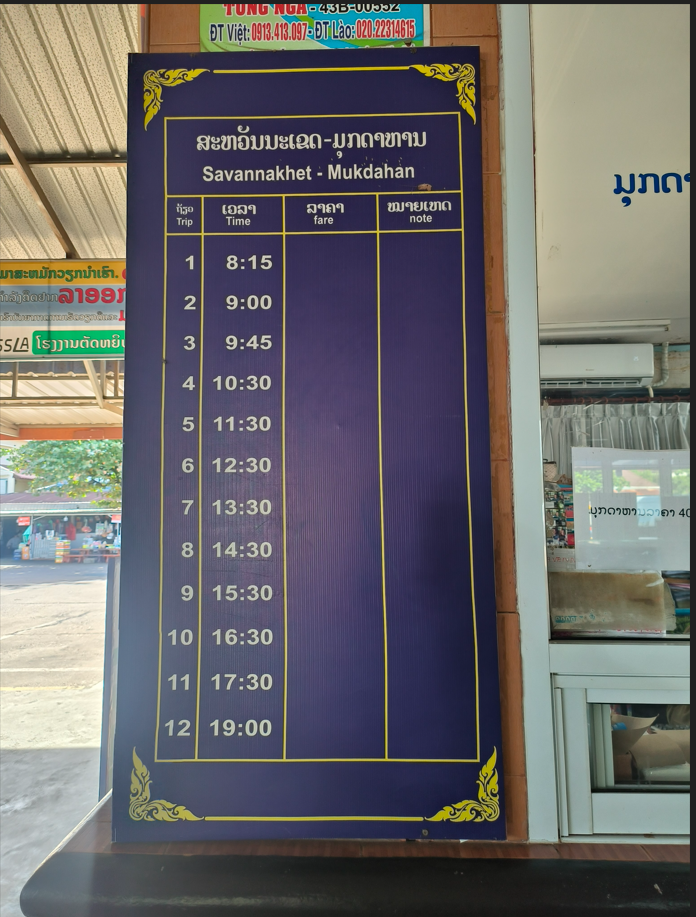
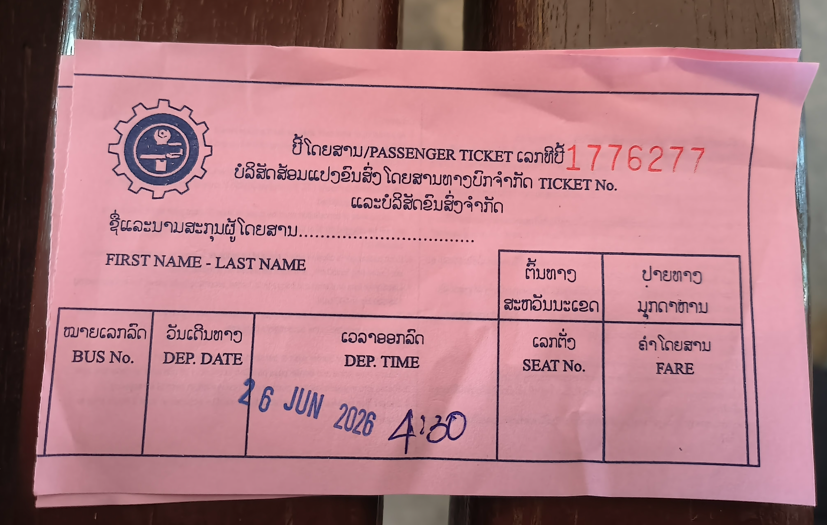
Buy Your 55 THB (40,000 LAK) Return Bus Ticket
At Savannakhet Bus Terminal, buy your return ticket to Mukdahan at the International Bus Ticket Counter. The fare is 55 THB or 40,000 LAK per person (12 daily departures from 08:15 AM to 19:00 PM).
Stamp Out of Laos & Scan 30 THB Exit Ticket
Present your passport to the Lao immigration officer for your exit stamp. Purchase the 30 THB (or 20,000 LAK) exit gate ticket, scan the QR code at the turnstile, and re-board your bus across the bridge.
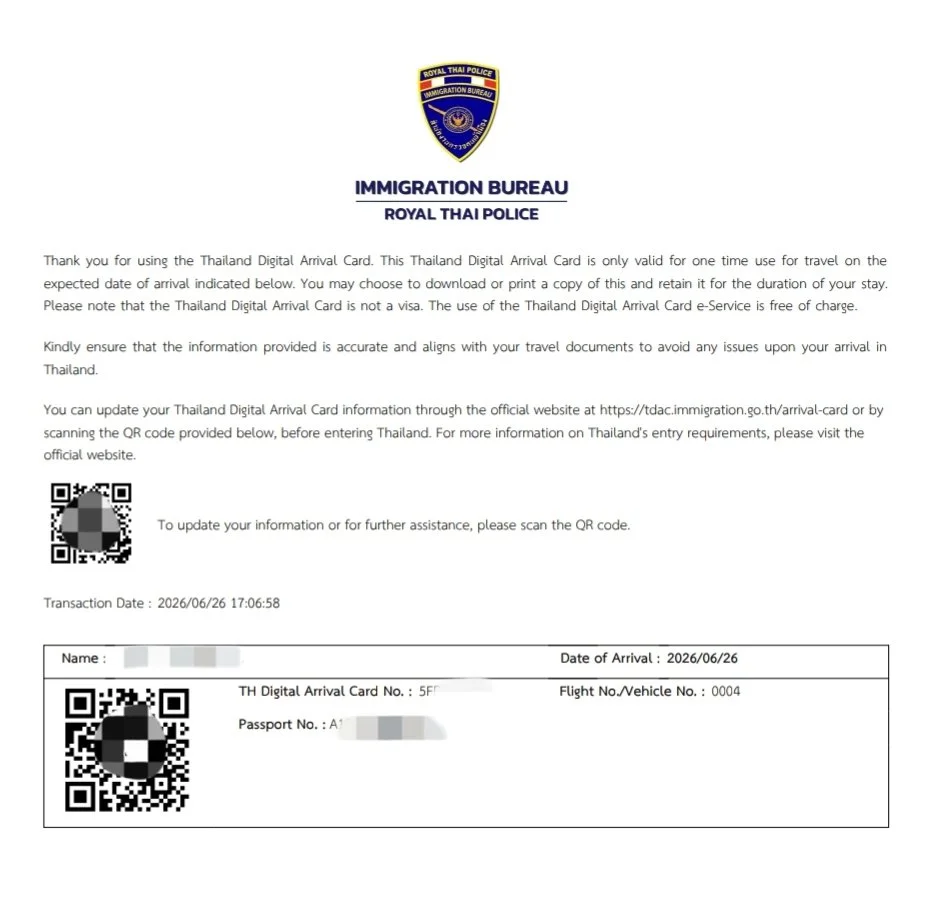
Prepare Your TDAC Before Crossing Back
Complete your free Thailand Digital Arrival Card (TDAC) at tdac.immigration.go.th up to 1 day before returning. Screenshot or print the confirmation QR code!
Go to the Separate Booth on the Left Side
When the bus drops you at Mukdahan Thai Immigration (ขาเข้า), proceed to the separate immigration office located on the left side of the main building where e-Visas are verified.
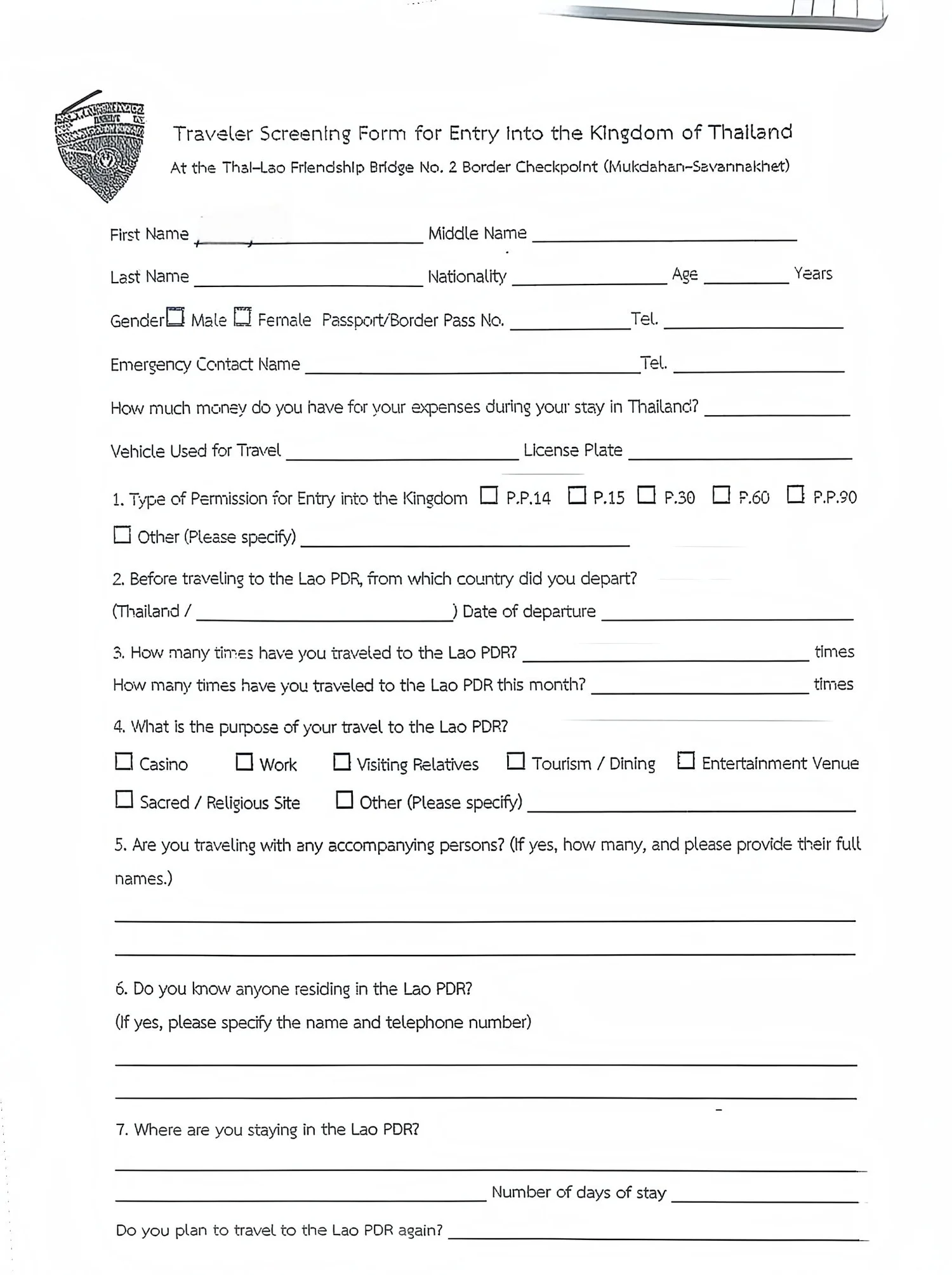
Complete the Traveler Screening Form
Inside the office, fill out the 1-page Traveler Screening Form for Entry Into the Kingdom of Thailand (Friendship Bridge No. 2) and hand the officer your passport + printed/digital Non-B e-Visa.
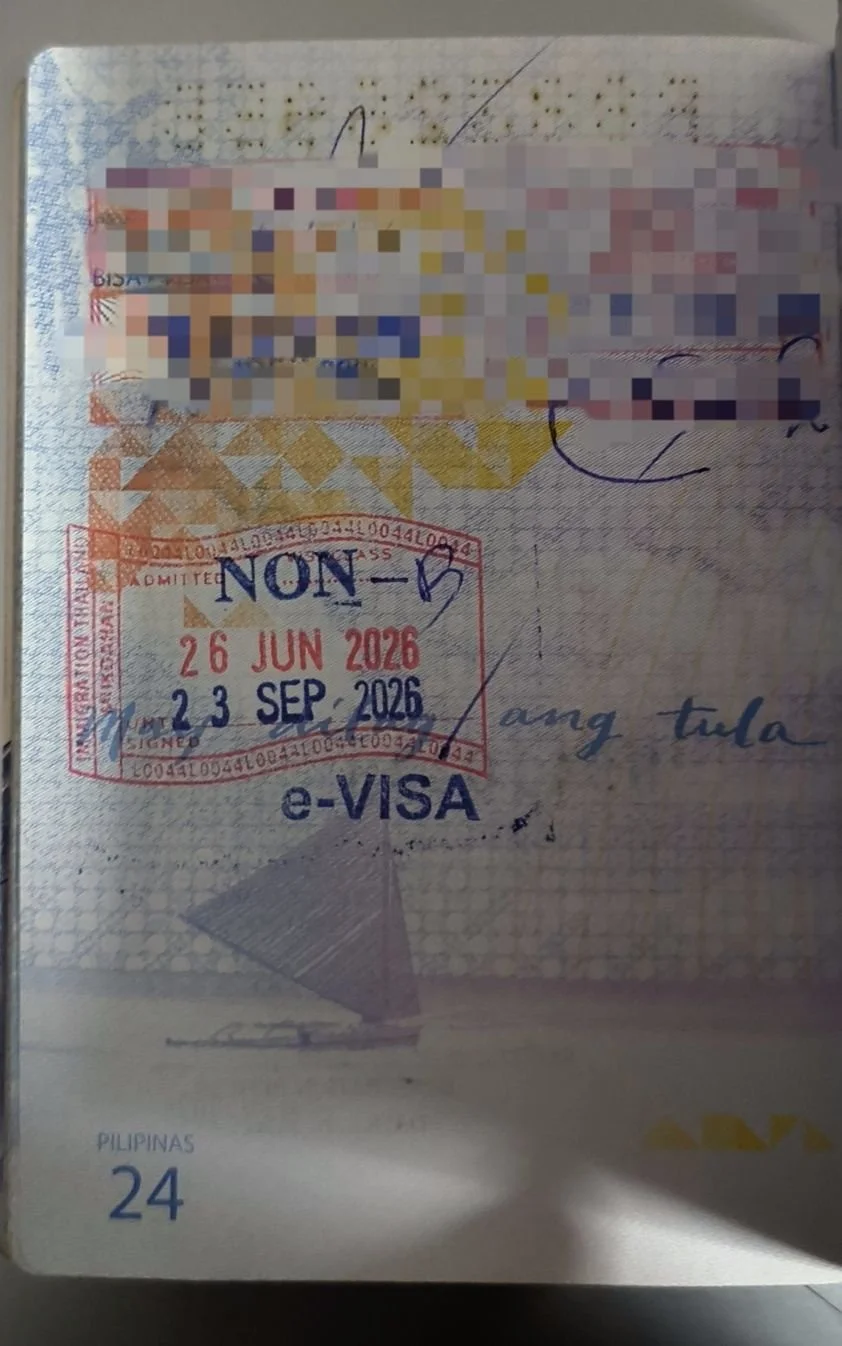
Verify Your 90-Day NON-B e-VISA Stamp
Before walking away from the desk, check your passport to confirm the officer stamped ADMITTED NON-B / e-VISA with a 90-day validity window! Board your bus back to Mukdahan Terminal (or catch the next shuttle with your ticket).
DIY Laos Non-B e-Visa FAQs
Clear answers to the most common questions about the Savannakhet and Vientiane Non-B e-Visa process.
Can I submit my Thai e-Visa application before I cross the border into Laos?
Why do I need to write down the bus number at Platform 10 in Mukdahan?
0899). Taking a quick photo of the front of your bus at Platform 10 ensures you have the exact number required.
What happens if I select Savannakhet on the e-Visa website but travel to Vientiane instead?
thaievisa.go.th must match your physical payment location in Laos. If you select Royal Thai Consulate-General, Savannakhet, you can only pay at the Savannakhet counter; if you go to Vientiane instead, you must create and submit a brand-new application.
What are the payment hours and fee for the Non-B e-Visa in Savannakhet?
How long does it take to receive the approved Non-B e-Visa in Laos?
Can someone help me prepare, compress, and upload my Non-B e-Visa files?
thaievisa.go.th, you can contact Abegail directly via phone or LINE at 091-841-3826 (Service Fee: 2,000 THB).
Written by Matthew John & Abegail Mercado
Kids English Thailand (K.E.T.) : Field Visa DocumentationMatthew John is the co-founder of Kids English Thailand (KET) and has spent 20 years guiding foreign educators through school placements and legal Non-B visas across Northern Thailand. Field screenshots, Mukdahan–Savannakhet border documentation, and e-Visa upload consulting were compiled by Abegail Mercado (LINE / Tel: 091-841-3826).
