

BookmarkPro P.P.5 Mastery Guide
ปพ.5 Grading Architecture
Operating guide for foreign teachers entering scores in OBEC secondary school registries. Step-by-step instructions for unit configuration, score saving, and grade normalization based on real classroom operations at Sukhothai Wittayakhom School (SUW).
Three Non-Negotiable Rules in BookmarkPro
Follow these three rules on every score entry session to prevent catastrophic data loss or calculation errors:
Always check the 'Serial Box' toggle on the score recording screen before entering student marks so scores match student IDs accurately.
Click the green 'Collect Points' button every 10 minutes to save your entries to the school server and prevent session timeouts.
Never change maximum unit capacities in 'Full Score Adjust' after student marks have been entered, or you will corrupt the final percentage math.
Always use the specific school BookmarkPro URL provided by your academic coordinator. The public address bookmarkpro.online is the commercial software vendor site, not your individual school server directory (for example, SUW teachers log into the school-specific /SUW/ directory). Never share your BookmarkPro account password in faculty LINE groups.
Thai Education and P.P.5 Compliance
Accurate record-keeping in the ปพ.5 (Por Por 5) registry is a formal legal mandate in Thailand. The BookmarkPro system serves as the official grade database for secondary schools operating under the Office of the Basic Education Commission (OBEC). Accuracy in this registry is critical because final scores feed into each student's cumulative GPAX for national university entrance.
Sukhothai Wittayakhom School (SUW) is one prominent partner secondary school that uses BookmarkPro to ensure transparent academic records. Other secondary OBEC schools across Thailand utilize the exact same software engine under different server sub-folders. Your academic department will provide you with the web address or local network file to access your classes.
National Grading Matrix
Secondary schools in Thailand follow an 8-point standardized grading scale (0.0 to 4.0). Foreign teachers enter raw numerical scores only. Do not attempt to adjust official ministry grade boundaries. The internal software engine automatically calculates weighted percentages and rounds to the official 0.0 to 4.0 scale.
| Thai Scale | Percentage Range | Thai Descriptor | Standard Meaning |
|---|---|---|---|
| 4.0 | 80 – 100% | ดีเยี่ยม | Excellent |
| 3.5 | 75 – 79% | ดีมาก | Very Good |
| 3.0 | 70 – 74% | ดี | Good |
| 2.5 | 65 – 69% | ค่อนข้างดี | Fairly Good |
| 2.0 | 60 – 64% | ปานกลาง | Fair |
| 1.5 | 55 – 59% | พอใช้ | Satisfactory |
| 1.0 | 50 – 54% | ผ่านเกณฑ์ | Pass |
| 0.0 | 0 – 49% | ไม่ผ่าน | Fail (Needs Remediation) |
📊 Interactive Thai Grade Simulator (0.0 to 4.0 Scale)
Test raw percentage marks against the official 8-point Thai Ministry scale.
The 8-Step Technical Workflow
Developed from real school operations by Momina Fatima and Matthew John, this workflow ensures error-free submission to the Academic Department (Wichakan):
| Step | Action Required | Professional Purpose |
|---|---|---|
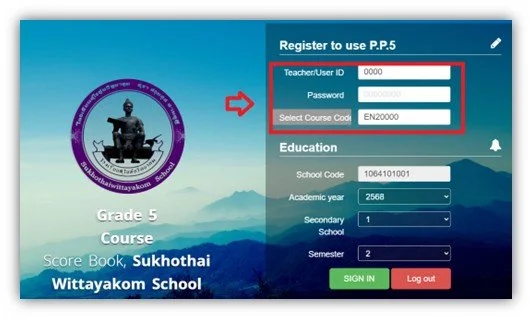
| 01. Auth | Access school server portal | Authenticate with School Teacher ID |
| 02. Scope | Select Course Code | Verify subject and room roster matches timetable |
| 03. Setup | Full Score Adjust | Set maximum marks per unit before entering scores |
| 04. Ratio | Overall Points | Configure weighted midterm and final exam distribution |
| 05. Entry | Serial Box Check | Mandatory student ID alignment sync before input |
| 06. Save | Collect Points | Commit data to server every 10 minutes |
| 07. Audit | Total Points Review | Audit distribution and identify remediation cases |
| 08. Submit | Print and Sign Hardcopy | Deliver signed physical P.P.5 book to Department Head |
P.P.5 Submission Progress Tracker
0 / 5 CompletedPhase 1: Infrastructure and Unit Setup
Begin by configuring unit boundaries in the Full Score Adjust menu. This ensures your digital registry matches the physical Course Outline submitted to the school administration at the start of the semester.
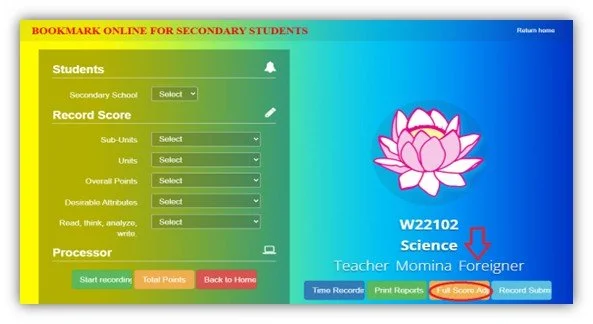
Enter unit names and assign marks based on your course syllabus. Modifying unit point allocations after student marks are entered can corrupt calculations and require manual database rollbacks.

Navigate to Overall Points to lock in weights for Pre-Midterm, Midterm, Post-Midterm, and Final evaluations. Ensure the combined total adds up to exactly 100%.

Phase 2: Score Recording Protocols
From the Home Page, select the Grade level, pick the specific Unit, and click Start Recording. CRITICAL: Before entering any marks, you MUST check the 'Serial Box' option to prevent identification misalignment.

BookmarkPro supports CSV imports. Ensure files contain only Student ID numbers and raw scores. After entering marks, always click the green Collect Points button to save data to the server.

Student Care is used strictly for daily morning homeroom attendance, flag assembly checks, and school gate monitoring. BookmarkPro is used exclusively for unit scores, midterm/final exams, and final P.P.5 grade submission. They run on completely separate servers.
Essential Teacher Portals and Workflow Suite
Expectations and Teaching Reality
Technical data entry is only one component of school operations. Success in a Thai secondary school requires understanding administrative customs:
Foreign teachers manage secondary classrooms independently. Thai co-teachers assist with administrative filings, but you lead lesson delivery and student focus solo across classes of 35 to 45 students.
Daily schedule changes, exam room shifts, and sports day dates are posted in school LINE groups. Check your faculty chat daily. Keep your personal BookmarkPro password confidential: never paste passwords into group chats.
Thai education emphasizes continuous student growth. If students score below the passing line (under 50%), teachers provide supplementary remediation worksheets, re-tests, or extra credit tasks to bring them up to a passing grade.
Arrival is 07:30 a.m. daily, with weekly gate duty rotations at 07:00 a.m. If you are sick or need leave, notify your academic department head on LINE by 06:30 a.m. and arrange class coverage directly with a fellow foreign teacher. Keep physical copies of all exam papers in your desk until the term concludes.
Video Guide: SUW Orientation Training Video Playlist ➔
Teacher FAQ
Answers to common grading, portal access, and administrative questions across OBEC secondary schools:
Why do BookmarkPro URL extensions vary between OBEC schools?
Extensions vary based on school server directories (such as /SUW/), but the core BookmarkPro software logic, score matrices, and database tables are identical across Thai secondary schools under OBEC.
How should student attendance under 80% be flagged in P.P.5?
Attendance below 80% requires an MS (มส) flag in the system. Always coordinate with your Head of Academic Department (Wichakan) before finalizing this entry.
How can I prevent server timeout data loss during finals week?
Always click the green 'Collect Points' button every 10 minutes. School servers experience heavy local network traffic during exam periods, which can trigger session logouts.
Am I required to retain physical student test papers?
Yes. Keep all physical test papers, quizzes, and project rubrics until the term officially closes. Original worksheets are required for random ministry academic audits.
What is the protocol for taking sick or personal leave?
Leave requests require notifying your department head on LINE by 06:30 a.m. and coordinating lesson coverage directly with another foreign teacher in your faculty.
How does the system calculate and round final grades?
The internal mathematical engine inside BookmarkPro automatically rounds total weighted percentages to the nearest whole number to assign the official 0.0 to 4.0 scale score.